


Inspiring
October 19, 2025
Question

Can someone help with this script?

  • October 19, 2025
  • 2 replies
  • 190 views

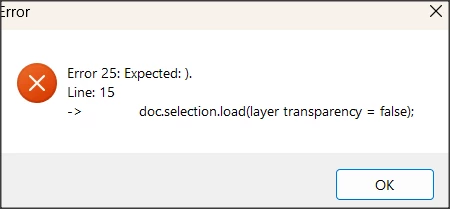
I am trying to get a script that selects the background of a layer and fills it with green.  This is repeated for all layers.  There might well be more than one error, but so far, it is erroring out "doc.selection.load(layer transparency = false);"  
 

#target photoshop
app.activeDocument.suspendHistory("Fill Background Green All Layers", "main()");

function main() {
    var doc = app.activeDocument;
    var originalLayer = doc.activeLayer;

    for (var i = 0; i < doc.layers.length; i++) {
        var layer = doc.layers[i];
        if (layer.kind == LayerKind.NORMAL && layer.visible) {
            doc.activeLayer = layer;

            // Select transparent areas (background)
            doc.selection.selectAll();
            doc.selection.load(layer transparency = false);
            doc.selection.invert();

            // Set green color
            var fillColor = new SolidColor();
            fillColor.rgb.red = 0;
            fillColor.rgb.green = 255;
            fillColor.rgb.blue = 0;

            // Fill the selection
            doc.selection.fill(fillColor, ColorBlendMode.NORMAL, 100, false);
            doc.selection.deselect();
        }
    }

    doc.activeLayer = originalLayer;
}


2 replies

Stephen Marsh
Community Expert
Community Expert
October 20, 2025

@mangurian 


Try this:


#target photoshop
app.activeDocument.suspendHistory("Fill Background Green All Layers", "main()");

function main() {
    var doc = app.activeDocument;
    var originalLayer = doc.activeLayer;

    // Ensure that a layer is selected - by r-bin
    try {
        activeDocument.activeLayer.link(activeDocument.activeLayer);
    } catch (e) { }


    for (var i = 0; i < doc.layers.length; i++) {
        var layer = doc.layers[i];
        if (layer.kind == LayerKind.NORMAL && layer.visible) {
            doc.activeLayer = layer;

            // Select all
            //doc.selection.selectAll();
            
            // AM code to load transparency as a selection
            var idsetd = charIDToTypeID("setd");
            var desc = new ActionDescriptor();
            var idnull = charIDToTypeID("null");
            var ref = new ActionReference();
            ref.putProperty(charIDToTypeID("Chnl"), charIDToTypeID("fsel"));
            desc.putReference(idnull, ref);
            var idT = charIDToTypeID("T   ");
            var ref2 = new ActionReference();
            ref2.putEnumerated(charIDToTypeID("Chnl"), charIDToTypeID("Chnl"), charIDToTypeID("Trsp"));
            desc.putReference(idT, ref2);
            executeAction(idsetd, desc, DialogModes.NO);

            doc.selection.invert();

            // Set green color
            var fillColor = new SolidColor();
            fillColor.rgb.red = 0;
            fillColor.rgb.green = 255;
            fillColor.rgb.blue = 0;

            // Fill the selection
            doc.selection.fill(fillColor, ColorBlendMode.NORMAL, 100, false);
            doc.selection.deselect();
        }
    }

    doc.activeLayer = originalLayer;
}


I'm not sure if this is a what you want, or the opposite?!

Stephen Marsh
Community Expert
Community Expert
October 20, 2025

@mangurian 


Where did you get the code from, AI?


doc.selection.load(layer transparency = false);


https://theiviaxx.github.io/photoshop-docs/Photoshop/Selection/load.html


mangurianAuthor
Inspiring
October 21, 2025

yes......chat GPT

Stephen Marsh
Community Expert
Community Expert
October 23, 2025

@mangurian 


Did you try the corrected script that I posted? It works, but I don't know if the result is what you're looking for or not.