Inspiring
November 27, 2025
Answered

Can't access Font Book on iMac

  • November 27, 2025
  • 5 replies
  • 318 views

New computer - iMac 2024.  Up to date Photoshop - 27.1.1.

My question is why aren't the fonts from my Font Book showing up in Photoshop?  They always have - for the past 20 years.  What's happened?  If I go to select a font in Photoshop it gives me a small selection. Can't see most of the fonts I used to be able to access.

Correct answer LAMY2017

Perhaps offering ways to protect yourself will give you the courage to push on --

* back up your computer!

* copy the folder(s)/files to a safe place outside Adobe folders; or rename the folder, e.g., "Old CT Font Cache"

* Delete this font cache file, knowing "Photoshop [will] create a new one," as the Adobe site indicates.


from the Search Assist (AI) tool in Firefox:
"The CT font cache on a Mac refers to the Core Text font cache, which is a system used by macOS to manage and speed up the loading of fonts. It stores information about the fonts installed on your system to improve performance, but can sometimes become corrupted, leading to display issues with fonts."
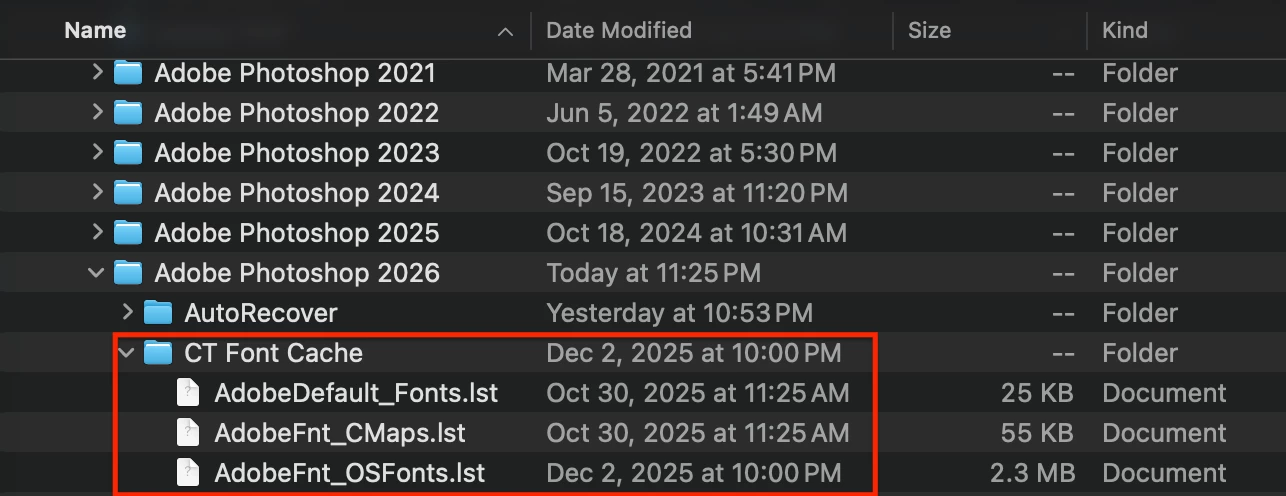
868063iEC08C1A05E45C4E9.png


(All six versions of Ps on my system have the CT folder)

 

5 replies

jane-e
Community Expert
Community Expert
December 7, 2025

@Redhartotter 


One more thing to look at is to see if you have a filter turned on in Photoshop and are hiding some of the typefaces. This may not be the issue, but it's an easy thing to check.

868187i1D9CFFABAD526B0A.png


Jane

Conrad_C
Community Expert
Community Expert
December 6, 2025

Is there anything in common with all of the fonts that aren’t appearing, such as their font format? 


For example, if the fonts you have been using for decades are PostScript Type 1 fonts, it’s expected that they will no longer appear in Adobe Creative Cloud applications because like many companies and applications recently, Adobe ended support for Type 1 fonts


Your fonts do appear in Font Book, so in addition to wondering which format the fonts are in, which version of macOS is running on the iMac? My Mac is on macOS 15, and it refuses to load my old Type 1 fonts into Font Book. So you have an interesting combination of Font Book loading the fonts but Photoshop not loading them. 

Inspiring
December 6, 2025

I appreciate your response.  Had a go at some of your suggestions but was somewhat nervous about delving too deeply into settings and preferences. Still looking forward a simple solution. 

LAMY2017Correct answer
Legend
December 6, 2025

Perhaps offering ways to protect yourself will give you the courage to push on --

* back up your computer!

* copy the folder(s)/files to a safe place outside Adobe folders; or rename the folder, e.g., "Old CT Font Cache"

* Delete this font cache file, knowing "Photoshop [will] create a new one," as the Adobe site indicates.


from the Search Assist (AI) tool in Firefox:
"The CT font cache on a Mac refers to the Core Text font cache, which is a system used by macOS to manage and speed up the loading of fonts. It stores information about the fonts installed on your system to improve performance, but can sometimes become corrupted, leading to display issues with fonts."

868063iEC08C1A05E45C4E9.png


(All six versions of Ps on my system have the CT folder)

 

Larry
Legend
November 28, 2025
 
Redhartotter, I think you'll find the answer on one of these webpages:
then,

Reset, restart & retry

If Photoshop is crashing on startup or while working with Type, follow these 3 easy steps for troubleshooting fonts.

1. Reset Photoshop's preferences

Backing up and restoring Photoshop's preferences will hide the Character panel and reset the selected tool to the default Move tool.  See Manually remove Photoshop Settings folder

2. Reset Photoshop's font cache

Resetting the Photoshop font cache will allow Photoshop to create a new enumerated font list.
See Reset the Photoshop font cache

3. Restart Photoshop and turn off Font Preview

Once you've restarted Photoshop, just choose Type > Font Preview Size and select None.


Turning off Font Preview will prevent Photoshop from rendering previews for any installed damaged fonts.


--

Delete the Photoshop font cache

The Photoshop font cache contains the enumerated list of fonts and font features installed to the system that Photoshop can use. Deleting this font cache file will allow Photoshop to create a new one.

macOS

1. Quit Photoshop and the Creative Cloud desktop app

2. Navigate to: /Users/[user name]/Library/Application Support/Adobe/Adobe Photoshop
For help navigating to this hidden user folder, see Can't see user library files in macOS.

3. Delete the CT Font Cache folder and empty the Trash.


Larry
