Participant
March 5, 2019
Question

Can't change the color of the path

  • March 5, 2019
  • 4 replies
  • 2235 views

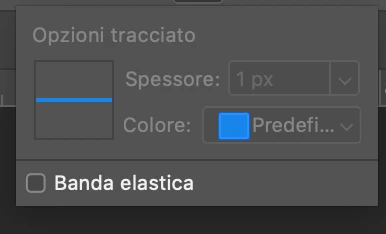
Hi guys, I have a problem with the path tool in Photoshop. If you see this screenshots you can notice that I can't change the color of the path which now is grey and this color is really difficult to see over an image. How can I resolve? Thanks.

This topic has been closed for replies.

4 replies

Participant
May 17, 2021

Same problem,  i faced too! Is there any solution to it?

c.pfaffenbichler
Community Expert
Community Expert
May 17, 2021

Is GPU usage enabled (see Photoshop > Preferences > Performance)?

Could you please post screenshots with the pertinent Panels (Toolbar, Layers, Options Bar, …) visible? 

Please read this (in particular the section titled "Supply pertinent information for more timely and effective answers”):

https://community.adobe.com/t5/using-the-community/community-how-to-guide-tips-amp-best-practices/td-p/11601738?page=1

Michael Bullo
Community Expert
Community Expert
March 5, 2019

Have you tried resetting the Preferences?

Preferences in Photoshop

Michael Bullo
Community Expert
Community Expert
March 5, 2019

Preferences > Guides, Grid & Slices

c.pfaffenbichler
Community Expert
Community Expert
March 5, 2019

Is GPU usage enabled (see Photoshop > Preferences > Performance)?