
Participant
May 16, 2023
Answered

Can't drag layers into libraries

  • May 16, 2023
  • 2 replies
  • 1092 views

So I've decided I'd like to animate with Adobe CC but I'm not being allowed to share or drag my Photoshop layers into libraries which is kind of killing the point of working with the software.  I've seen a couple of tutorials outlining the supposed simple process for doing this but nothing has worked. Thanks for any advice or help.
This topic has been closed for replies.
Correct answer Kevin Stohlmeyer

There is an noted bug with the CC Libraries in Photoshop not allowing drag and drop input.

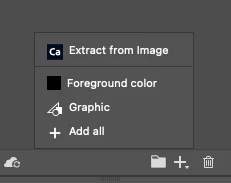
Instead go to the + at the bottom of the library panel and choose "Graphic" with the layer selected.


2 replies

Participant
April 24, 2024

Almost a year late. But found a better solution that allows you to drag and drop into Adobe Libraries. If you are running any ARM (M1,M2 or M3) Processor, Your mac book comes pre-installed with Rosetta. But essentilly what you need to do is have PS open up using Rosetta and it should work like normal. 

Right Click PS in Application Folder > Get Info > Select (Open using Rosetta)

Restart PS and should be working great! More info on Rosetta Here
https://support.apple.com/en-us/102527

Kevin Stohlmeyer
Community Expert
Kevin StohlmeyerCommunity ExpertCorrect answer
Community Expert
May 16, 2023

There is an noted bug with the CC Libraries in Photoshop not allowing drag and drop input.

Instead go to the + at the bottom of the library panel and choose "Graphic" with the layer selected.


Participant
May 16, 2023

 I gave it a shot and voila! Thanks a million, much appreciated sir.