Known Participant
January 15, 2019
Answered

Can't find Slice tool in Photoshop CC 2019

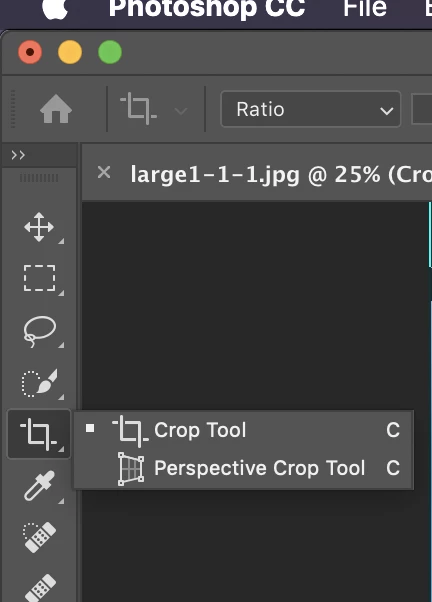
Can someone help in understanding where did the Slice tool go?
Message was edited by: Gaurav Pandey

    This topic is closed to new replies. Start a new post to keep the conversation going.
    macpawel
    macpawelCorrect answer
    Participating Frequently
    January 15, 2019

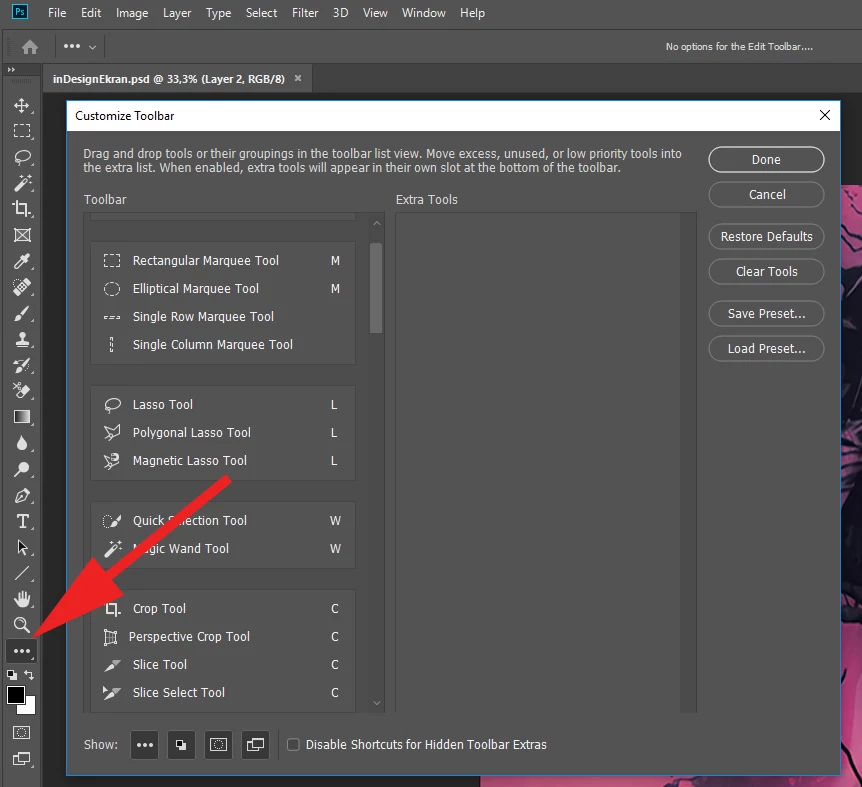
    Try to use Customize Tool bar Button

    4 replies

    Participant
    June 21, 2020

    Hi there, I´m having the same issue, but when clicking in the 3 dots I dont see anything and get the message "No Options for the Edit Toolbar".


    I´m using Adobe PS 2020 for Mac 


    Translate
    jane-e
    Community Expert
    Community Expert
    June 21, 2020

    Hi Gastonv,

    • Can you see this entire thread including how to use the search button to find tools?
    • In addition, Edit menu > Toolbar is a second way instead of using the ellipses.

    Let us know if either of these methods works for you.

    ~ Jane

    Translate
    jane-e
    Community Expert
    Community Expert
    January 15, 2019

    pandeyg2106  wrote

    Can someone help in understanding where did the Slice tool go?

    Tools can be hidden and rearranged, so a second method to find a tool is this:

    • Click the magnifying glass in the options bar
    • Confirm the menu bar is set to All or to Photoshop and start to type
    • Click the tool you are looking for and Photoshop will select the tool for you. It is outlined in blue for less than a second, so watch your toolbar.

    ~ Jane

    Translate
    macpawel
    macpawelCorrect answer
    Participating Frequently
    January 15, 2019

    Try to use Customize Tool bar Button

    Translate