
Can’t launch Photoshop after installing Beta version 27.0.1 (even after uninstalling both versions)
Hello guys,
I was using Photoshop version 26.11 (official) perfectly fine.
However, after installing Photoshop Beta 27.0.1, I can no longer open any Photoshop version — neither Beta nor the official release.
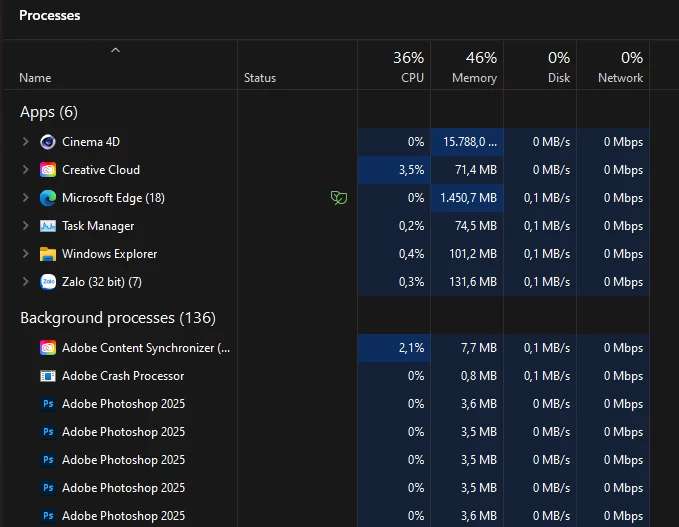
Even after uninstalling both versions, cleaning with Adobe Creative Cloud Cleaner Tool, and restarting my computer multiple times, the issue persists. When I click the Photoshop icon, it appears in Task Manager (Background processes tab) but no splash screen or UI ever shows up.
Other Adobe apps like Illustrator (Ai) and After Effects (Ae) are working normally, so the issue seems isolated to Photoshop.
Could anyone please help me fix this?
Let me know if I should provide any additional logs or system information to assist the troubleshooting.
System details:
OS: Windows 11
- CPU: I7 13700K
- GPU: RTX 3090
- RAM: 64GB
Photoshop versions affected: 26.11 (Official), 27.0.1 (Beta)
Thank you in advance for your help!
Best regards,
Adan.



 AdChoices