
Participant
October 18, 2017
Question

Can't Make Adobe Photoshop CC 2018 Default Application in macOS Sierra

  • October 18, 2017
  • 27 replies
  • 31012 views

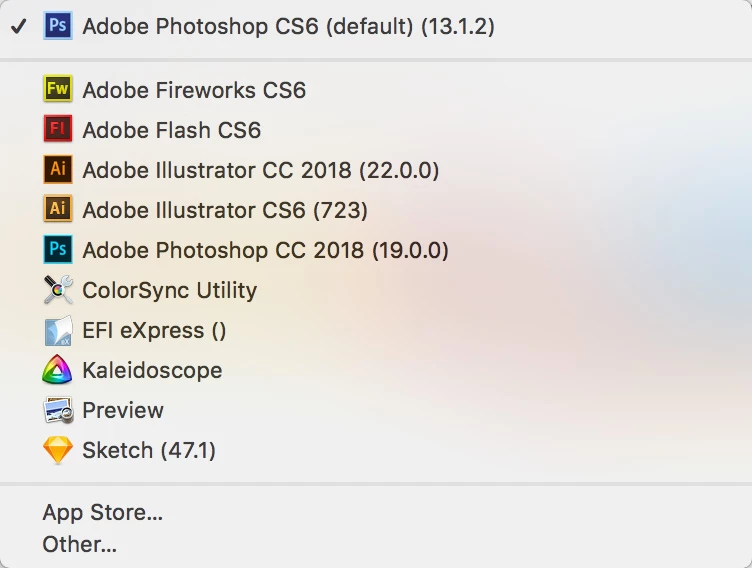
Just updated from CC 2017 to CC 2018 today. Prior to the update, CC 2017 was my default application for all PSD, JPEG, GIF, PNG, etc. files. I still have CS6 installed on my Mac and it's now the default application for these files. I can change it to Adobe Photoshop CC 2018 (19.0.0.) individually for each file, but I can't to a system wide change through Finder.

When I right-click a file and choose Get Info and change Open With to Adobe Photoshop CC 2018 (19.0.0.) and click Change All it immediately reverts back to CS6 as the default. But I can do the above steps on a file-by-file basis and it will stick for each file.

I restarted and zapped PRAM but it did not fix the issue. Haven't tried uninstalling CS6, but the point is I had CS6 installed along side CC 2017 and CC 2017 had no trouble being assigned the default status.

Did I find a bug in CC 2018?
    This topic has been closed for replies.

    27 replies

    Armadillo77
    Known Participant
    December 6, 2017

    I’m having the same issues with Microsoft Word. So it’s not exclusive to Adobe. It’s a Mac OS thang.

    Participant
    December 6, 2017

    Depends, maybe as app developers they're meant to know this and do something about it?

    Build it in a way that is doesn't happen in the first place? For example, upon updating... remove references to the previous version that no longer exists. Probably a pretty key part.

    Participant
    December 6, 2017

    Figured out a fix for this, if you don't have the older version installed.

    As suggested here: How to Remove Duplicates & Customize the “Open With” Menu in Mac OS X « Mac Tips :: Gadget Hacks

    I believe this is probably Adobe's fault because they've been retarded for years rather than MacOS, but, anyway...

    The "Open With" apps are made up from a file which needs to be reset, as suggested on the post you can do this by doing the following opening terminal and running the following line:

    /System/Library/Frameworks/CoreServices.framework/Frameworks/LaunchServices.framework/Support/lsregister -kill -r -domain local -domain system -domain user; killall Finder

    After running this the older missing version of photoshop disappeared from the menu.

    russelld43077854
    Participant
    February 27, 2018

    This issue was driving me insane... all of my jpeg, png, tif files were opening in Illustrator regardless of how many times I chose PS 2018 as the default application under info >>> other. This was happening with both my work computer running Sierra (but not on others in the office) and my home computer running El Capitan.

    I ran the terminal command joe.pagan offered above and that solved this irritating issue. Thank you! Not only did everything that should be defaulted to PS 2018 become so, but the list of programs under "open with" also returned.

    Here's Joe.pagan's command line again:

    /System/Library/Frameworks/CoreServices.framework/Frameworks/LaunchServices.framework/Supp ort/lsregister -kill -r -domain local -domain system -domain user; killall Finder

    gener7
    Community Expert
    Community Expert
    February 27, 2018

    I've used it before, but I found out about an issue with FireFox Quantum that was removing Photoshop from the "Open With" list  when saving images.

    1437281 - OSX dragging image to desktop changes OSX File associations

    If that doesn't apply, I hope the fix stays. If it returns and you use FF, discontinue use until the bug is fixed.

    grafixlad
    Participant
    December 5, 2017

    Same issue.

    Had CS6 on my machine. Recently updated to High Sierra. Just installed new 2018 Photoshop CC today.

    The only way I could get PSD files to default to 2018 was to run uninstaller for CS6.  Sad. :-(

    Once I ran uninstaller & restarted, default for PSDs went to 2018.

    Seems to work correctly now, but shouldn't have had to uninstall CS6 to make this work.

    Big BOOOO on this one Adobe!

    keithacurtis
    Participant
    November 29, 2017

    For what it's worth, I have the same problem with Photoshop CS6. It is the only Photoshop on my machine; I am not a CC subscriber. A couple of weeks ago, I started losing file associations, only with Photoshop. Sometimes I can get it to stick by "Change All..." in the Get Info box, but Photoshop is never in the list of default applications, even for .psd files.

    Using High Sierra

    gener7
    Community Expert
    Community Expert
    November 29, 2017

    About High Sierra: News about High Sierra on Twitter 

    Joel xo
    Inspiring
    November 17, 2017

    Having the same problem on El Capitan 10.11.6

    Participant
    November 7, 2017

    I'm running on MacOS High Sierra and also have this issue don't want to downgraded back to CC2017 cause I wanted to test their new features.

    gener7
    Community Expert
    Community Expert
    November 7, 2017

    You can install and use both 2017 and 2018.

    Participant
    November 2, 2017

    I have the same problem as outlined in the OP,  running MacOS Sierra 10.12.6 fully updated. I can change the default app to a program other than Photoshop, but when I try to set CC 2018 as the default it switches to CS6.

    Participant
    October 25, 2017

    I was having the same issue after updating as well, but the default application was Slicy. This has occurred on both my MaBook Pro and iMac desktop. Both are running macOS Sierra 10.12.6


    In any case I was able to get all .psd files to open in Photoshop CC 2018 as the default by doing the following on my iMac:

    1. Right click on the File and Select "Get Info"
    2. In the "Open With" section, select "Adobe Photoshop CC 2018.app" as the application (I am concerned with the general/ Kind saying "Slicy Workflow")
    3. Click the "Change All..." button directly below

    This worked immediately with all other .psd files. I HAVE NOT done the following yet:

    1. Turned off or signed out of the compter
    2. Tried the same on my MacBook Pro
    3. Figured out why "Kind" in the general are of Get Info says Slicy workflow

    I'll report back later today after I have some time to test on my laptop and sig  in and out of the iMac as well. I hope this helps others.

    Participating Frequently
    October 25, 2017

    Lee, the problem occurs when you have Adobe CS6 or Adobe CS5 installed. As the original poster stated, when we try to use the "change all", it immediately switches back to having CS6 (or CS5) as the default. The association with CC 2018 will not "stick".

    I assume yours worked because it was not an Adobe Photoshop version that had the wrong association. Those on this thread are having issues when they have an earlier PS version installed.

    Participant
    October 25, 2017

    Hi GeekGoddess,
    Thank you for pointing that out. I posted as I was having the "general" issue of not being able to set Photoshop as the default for PSD files any other way than doing what I stated above. Mine was not even going to Photoshop, but a completely different application so I figured this might be helpful for others potentially experiencing the same issue.

    This thread is the only one I found when doing a Google Search, and the title "Can't Make Adobe Photoshop CC 2018 Default Application in macOS Sierra" did not state a version, so I figured I would post for others like me coming along.

    I do have versions installed going all the way back to CS6 Master Suite as an FYI. Hopefully my explanation helps others, regardless of the actual application the PSD file is trying to default to.

    D Fosse
    Community Expert
    Community Expert
    October 25, 2017

    It seems to me that this time at least, Mac is hit by the same problem that has existed on Windows for ages, and which has been reported en masse with every new release:

    Uninstalling a previous Photoshop version after the new one is installed, breaks the file associations.

    During the uninstall, associations revert to the old version, and as a result, are left orphaned. The problem, of course, is that the CC app does this by default. The "remove old versions" checkbox should not be checked by default, and it should be much more conspicuous. Even better, it should reverse the order of operations - uninstall first, then install.

    Photoshop should always be installed and/or uninstalled in strict chronological version order! Last in, first out. That's the only way to avoid problems.

    Participating Frequently
    October 25, 2017

    @D Fosse: Your guess is wrong. I installed all Photoshop versions chronologically over the years and still ended up with this bug after installing PS 2018 on macOS Sierra.

    D Fosse
    Community Expert
    Community Expert
    October 25, 2017

    Yes, but did you leave the old versions installed? Did you uncheck this?

    Your previous posts here don't say.

    Magnus Lewan
    Participating Frequently
    October 25, 2017

    Same problem, where the association goes back to PS CS5. It is peculiar that one can change the association of individual files without any problems, but as soon as one tries "Change all..." then it decides CS5 must be better than CC 2018.