Participant
October 19, 2017
Answered

Can't make eraser from last brush used

  • October 19, 2017
  • 21 replies
  • 41235 views

Hi,


with the new Photoshop CC 2018 I can't make eraser from last brush used.

I have lots of tpl tools.

For example - I use one of my tpl brushes with some settings and then I need same eraser - same shape, same settings.

But when I choose eraser and last brush used - eraser switches to brush.

It's impossible to work like this 😕😕

Is there a way to turn of this automatic tool change?


Please help

This topic has been closed for replies.
Correct answer davescm

There is no fix as it is not broken but working the way Adobe designed it.

In the new version of Photoshop brushes can be saved with or without tool presets i.e. a brush can be saved with or without the associated tool and tool settings. When you, or a brush designer, defines a brush the choice to include the tool presets is made at that stage.

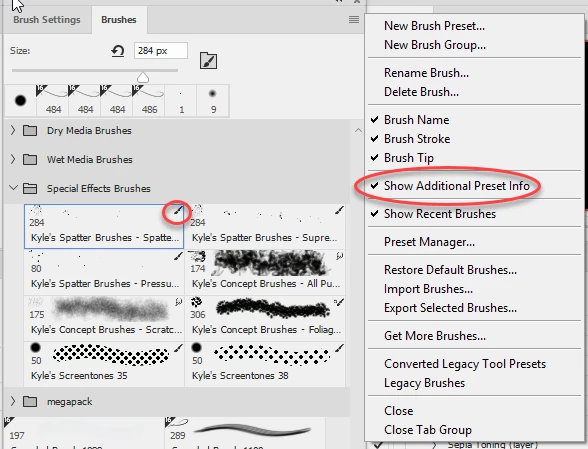
To see which have tool settings and which have not, in the brushes panel, go to the options at the top right and check " show additional preset info"

A small icon will appear next to those brushes that have a tool settings saved with them
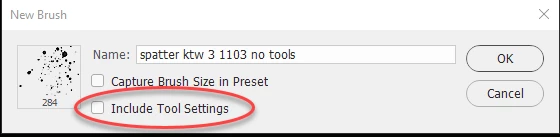
If you want to use a brush that is defined to use one tool, with another range of tools then you need to select the brush then choose "New Brush Preset" at the top of the menu, then in the dialogue give the brush a new name and uncheck "Include tool settings". You will now have a copy without it being tied to a particular tool.
Dave

21 replies

Participant
May 18, 2018

this is EXACTLY why I hate CC, it keeps messing with my tools and makes PS unusable any longer!

Participant
April 11, 2018

This is an incredibly frustrating change. The best answer is not working for me and I will need time at home to research further.

Bad design decision.

Participant
April 11, 2018

Read davescm's post...

"...Ctrl+Alt (Cmd+Opt on Mac) and click on a brush to load it without changing tools to the associated tool preset."

Participating Frequently
April 11, 2018

Calemazza, he said that does not work for him, and I'd believe him. It only works about half the time for me.

Its a real productivity issue. To add something should require the additional key command, not to use the basic (and actually useful) feature. Adobe broke the brush tool, the key command is not a fix-all, even when it works.

Participating Frequently
March 15, 2018

Just because Adobe designed it a certain way doesn't mean they didn't break it.

If I intentionally throw a glass on the floor, it is definitely broken, and its definitely intentional. Just because I meant to break the glass does not mean the glass isn't broken.

The two are not exclusive of each other, especially in this case.

Known Participant
March 14, 2018

Funny. I just went through a trouble shooting call with Adobe. They told me it is a software issue, that it is a bug. My PS does not work correctly with the swap of brush to eraser, and vice versa. They gave me the "workaround" of switching to brush mode to "clear" when I want my brush to act like an eraser. They told me it would be some time before it is fixed. I gave them control of my computer during the call and this is what they ascertained.

I lost use of one of my wacom tablets due to the new PS (and the age of the tablet to be fair). Bounding boxes don't appear. The upgrade is total BS in my ever so humble opinion. I'd rather have the old PS back.

Participant
January 30, 2018

This is a ridiculous change.

davescm
Community Expert
Community Expert
January 31, 2018

With version 19.1.0, released in January, you can press Ctrl+Alt when clicking on a brush (Cmd+Opt on Mac) and the tool will not change even if the brush has a tool preset saved with it.

Dave

linusb4846377
Participant
February 14, 2018

This does not help with the root problem. I feel that many of the developers are not actually digital artists who understand the hang up this change has created to the workflow of actual artists. This is a big deal for digital painters. There is no way I am going to waste any time meticulously re-saving every brush to the different presets nor am I going to waste the time to sort between which brushes are set to which preset. This is a senseless feature. In all previous versions of PS we could use any shape brush with which ever tool we chose and this was exceedingly convenient for work flow. Please be as annoyed by this as Photoshop users on this forum, and get the message to the developers.

Participant
December 27, 2017

Gah, this is so annoying. I've got to figure out how to use an old version of PS because this kills my workflow. Can't even find where I could rebind these key shortcuts to not be so awkward to use either...

November 23, 2017

Any news on this Adobe? Is there a fix in the making?

davescm
Community Expert
davescmCommunity ExpertCorrect answer
Community Expert
November 23, 2017

There is no fix as it is not broken but working the way Adobe designed it.

In the new version of Photoshop brushes can be saved with or without tool presets i.e. a brush can be saved with or without the associated tool and tool settings. When you, or a brush designer, defines a brush the choice to include the tool presets is made at that stage.

To see which have tool settings and which have not, in the brushes panel, go to the options at the top right and check " show additional preset info"

A small icon will appear next to those brushes that have a tool settings saved with them

If you want to use a brush that is defined to use one tool, with another range of tools then you need to select the brush then choose "New Brush Preset" at the top of the menu, then in the dialogue give the brush a new name and uncheck "Include tool settings". You will now have a copy without it being tied to a particular tool.

Dave

November 23, 2017

I get that Adobe changed the behavior in the brush library and the tiny icons help a bit. That isn’t my main problem with it.

Whenever I go from the brush tool to the eraser tool and use the brush history (right-click) I see all the brushes I recently used in all tools. When I click on one of those I would want to use that brush shape in my currently selected tool, as it was before the update.

What happens instead is totally unpredictable, as the tiny tool icons are not shown in the brush history. I have no way of knowing if selecting a brush shape from the history will switch my currently active tool, too. So at least this part is broken.

An easy fix would be a button to remove tool settings for a selection of brushes at once. I’m not going to change them one by one for several hundred brushes.

Participant
November 20, 2017

Agreed - please change this back.  It's incredibly frustrating.

Participating Frequently
October 21, 2017

Redo the brush preset, but when you do, unclick where it says 'preserve settings'.

October 22, 2017

Thanks for the tip. Any idea how to apply this on whole brush sets like the new ones from Kyle T Webster?

Participating Frequently
October 22, 2017

Alas, no. I was just having the same problem as everyone, then realized I could just redo my brush. I haven't used Kyle's brushes, so I assume they all come with the 'brush' preset. Which sucks.

October 21, 2017

Same here, I also would love to get the old behavior back.