Participant
October 19, 2017
Answered

Can't make eraser from last brush used

  • October 19, 2017
  • 21 replies
  • 41235 views

Hi,


with the new Photoshop CC 2018 I can't make eraser from last brush used.

I have lots of tpl tools.

For example - I use one of my tpl brushes with some settings and then I need same eraser - same shape, same settings.

But when I choose eraser and last brush used - eraser switches to brush.

It's impossible to work like this 😕😕

Is there a way to turn of this automatic tool change?


Please help

This topic has been closed for replies.
Correct answer davescm

There is no fix as it is not broken but working the way Adobe designed it.

In the new version of Photoshop brushes can be saved with or without tool presets i.e. a brush can be saved with or without the associated tool and tool settings. When you, or a brush designer, defines a brush the choice to include the tool presets is made at that stage.

To see which have tool settings and which have not, in the brushes panel, go to the options at the top right and check " show additional preset info"

A small icon will appear next to those brushes that have a tool settings saved with them
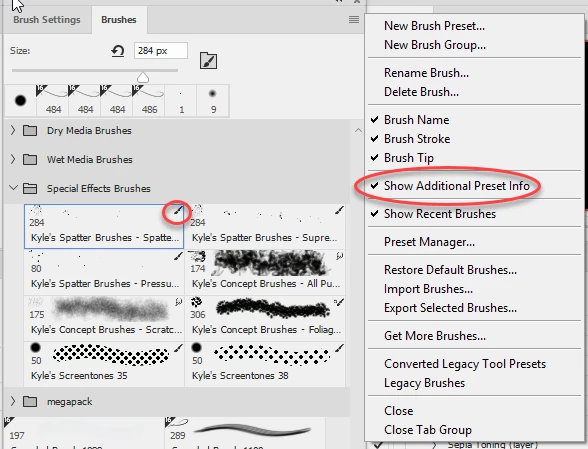
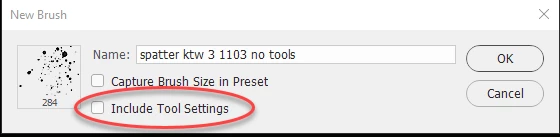
If you want to use a brush that is defined to use one tool, with another range of tools then you need to select the brush then choose "New Brush Preset" at the top of the menu, then in the dialogue give the brush a new name and uncheck "Include tool settings". You will now have a copy without it being tied to a particular tool.
Dave

21 replies

Adobe Employee
October 19, 2017

Currently the MRU in Brushes retain the tool association if there is one, from the Tool Preset or a Brush Preset saved with Tool Settings. A work around would be to switch the Blend mode to Clear to use the same brush with erasing behavior. (option/alt + shift + r)

selecting the brush or MRU again will return the tool to the previous blend mode. (option/alt+n sets to Normal as well)

gagatka27Author
Participant
October 19, 2017

Thank You - that helped for now. Will there be an option in the future to make it the way it always was?

All the best - and I really love this smoothing brush option!