Participant
April 24, 2020
Question

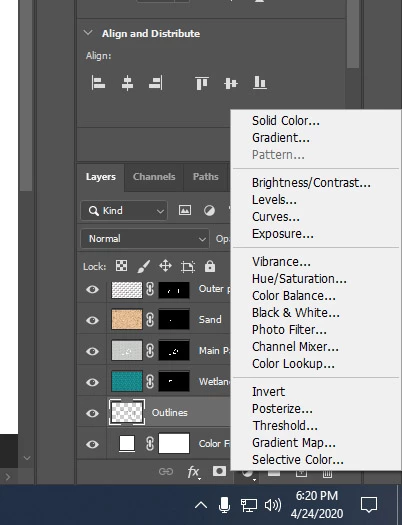
Can't make new pattern fill layer

  • April 24, 2020
  • 3 replies
  • 3119 views

I have been using pattern fill layers on this project, but all of the sudden the option is greyed out.


Why?
3 replies

Max Chroma
Known Participant
January 22, 2023

Wow Adobe really never fixed this bug??   Lol I just encountered it myself too... it appears when adding patterns in creating new patterns... apparently there is a limit to how many patterns photoshop can have and then it just greys out the option in the button?  But not in the layer menu like you showed.... repeated exact same bug,  deleted some of the standard pattern groups and its back again not greyed out.  Adobe fix this. 

sanzozconsulting
Participant
September 12, 2024

Great tip that Max, I created some patterns today, the Pattern option was greyed out when using the Adjustment layer method. So as suggested I deleted two of my not so good patterns, all good again, I can add patterns with the Adjustment Layer option again. Thumbs up!

Participating Frequently
July 14, 2020

Check if the issue is related to the selection. Otherwise, take a backup of your custom preferences and any other custom assets and clean the preferences. It should bring back the options.  

c.pfaffenbichler
Community Expert
Community Expert
April 25, 2020

Could you please post a screenshot with the pertinent Panels (Patterns, Toolbar, Layers, Options Bar, …) visible? 

Geovanardin
Participant
July 13, 2020


I'm having the same problem, but i can create a pattern fill using (Layer > New Fill Layer > Pattern). I already tried to restore the preferences but nothing seems to work.
