
Participant
October 18, 2020
Answered

can't make paint bucket non-contiguous in Photosho v21.2.4

  • October 18, 2020
  • 1 reply
  • 474 views

With the most recent update, using the "Painting" workspace, there appears no option to toggle the paint bucket tool between "contiguous" and "non-contiguous" There are a bunch of cute little icons with no text, not even mouseover text on the top bar, but none of them seem to apply to contiguity.
This topic has been closed for replies.
Correct answer davescm

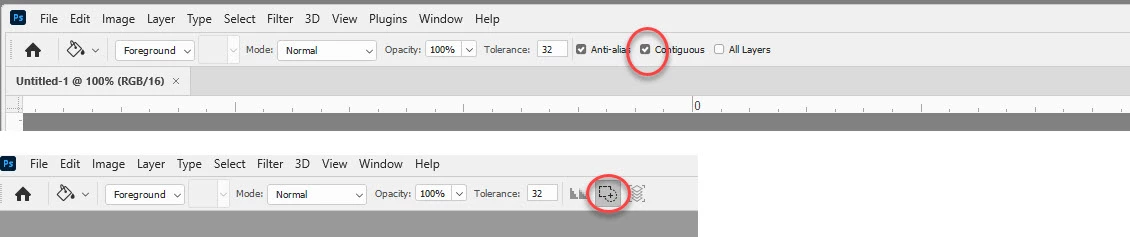
It sounds like you might have the narrow options bar enabled in Preferences > Workspace. You can switch to normal by unchecking it, clicking OK then closing and restarting Photoshop.


Either way, the contiguous button is here:


Dave

1 reply

davescm
Community Expert
davescmCommunity ExpertCorrect answer
Community Expert
October 18, 2020

It sounds like you might have the narrow options bar enabled in Preferences > Workspace. You can switch to normal by unchecking it, clicking OK then closing and restarting Photoshop.


Either way, the contiguous button is here:


Dave

mlibickiAuthor
Participant
October 19, 2020

That worked! Thanks! (I did try clicking that bulging-square icon and I don't think it helped, but either way, I can see my words again now!)