Participant
October 18, 2018
Answered

Can't move a GROUP.

  • October 18, 2018
  • 3 replies
  • 6359 views

Can't move a GROUP with the move tool.  PS 20.0 grabs the last single item that I was working on within that group. Never had this happen before; been using PS since '89. Anyone else have this issue?

Correct answer dianer_macperson

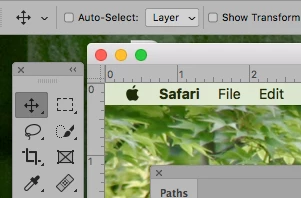
check your settings if you are auto selecting, you have the option of "layer" or "group"

3 replies

Participant
April 24, 2026

Could be a Pisces problem, I came looking for it too!  Moving with the move tool used to be easier and should remain easy to do!  I am having problems with it randomly deciding to select rather than move groups that are already selected. (PS Beta)


DaveGink
Participating Frequently
July 9, 2021

It's a horrible change. You should be able to grab the group folder icon and move the entire group, or select the individual layers and  move them individually. Not either or. 

Participant
June 25, 2023

I don't like this either!  Then when I uncheck that Auto Select box and choose group, I get a message that I can't move the group because there is a locked layer.  There is no locked layer. 

Why did Adobe have to mess up such an easy thing?

dianer_macperson
dianer_macpersonCorrect answer
Inspiring
October 18, 2018

check your settings if you are auto selecting, you have the option of "layer" or "group"
dianer_macperson
Inspiring
October 18, 2018

or if they are in a group folder and you aren't using auto select, you must be clicked on the folder to move the whole group. or shift click all the layers in the group. your auto select is on if the checkbox has been checked.

and of course you can always link your layers too.. : )

Trevor.Dennis
Community Expert
Community Expert
April 25, 2026

Auto Select is one of those functions everyone comes to hate in time.  Keep it turned off, and use the Spring loaded shortcut Ctrl/Cmd clicking over the area whose layer you need to select.  And generally keep it set to Layer in the Options bar.