
Participant
February 21, 2025
Answered

Can’t see layer thumbnails—any fix?

  • February 21, 2025
  • 1 reply
  • 190 views

Hi,


Suddenly, my layer thumbnails are not displaying in the Layers panel. I tried increasing the thumbnail size and resetting my workspace, but nothing changed. It’s really frustrating because I rely on the previews when working with multiple layers.


Any idea what’s causing this?
Correct answer AxelMatt

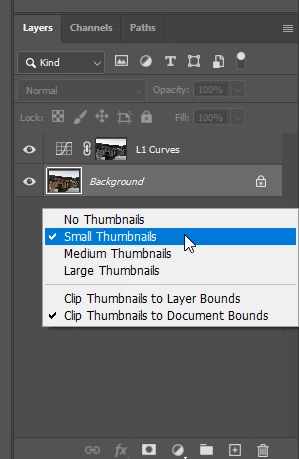
Do a right click on free area of the layer panel and choose the appropriate option for the thumbnails in the pop up - menu.


1 reply

AxelMatt
Community Expert
AxelMattCommunity ExpertCorrect answer
Community Expert
February 21, 2025

Do a right click on free area of the layer panel and choose the appropriate option for the thumbnails in the pop up - menu.


My System: Intel i7-8700K - 64GB RAM - NVidia Geforce RTX 3060 - Windows 11 Pro 25H2 -- LR-Classic 15 - Photoshop 27 - Nik Collection 8 - PureRAW 5 - Topaz Photo
Inspiring
February 10, 2026

I’m having that same problem but I DO have thumbnails selected in the pane’s options. It just started happening.