Felix+Shishaw
Participant
June 13, 2026
Answered

Can't use premium ai credits

  • June 13, 2026
  • 2 replies
  • 47 views

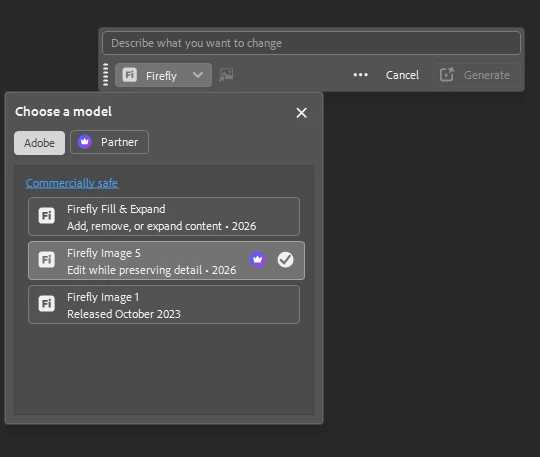
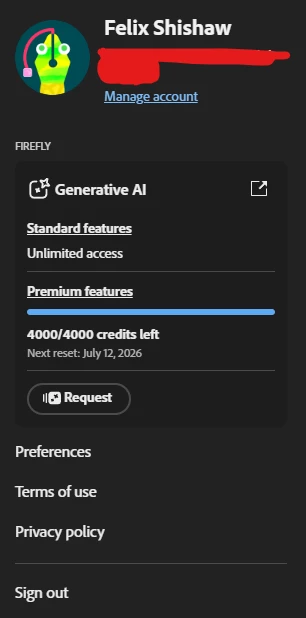
I have 4000 “Premium features” credits left, and unlimited access to “standard features” in generative ai tab, but when i’m trying to use them generate button in photoshop is grayed out, not being available to click
I’m trying to use new Firefly Image 5 and partner ai tools, but nothing works, while Firefly Image 1 and Fill & Expand does work as usual


Correct answer Anshul_Saini

Hi ​@Felix+Shishaw,

Thanks for reaching out. Based on your screenshot, I don’t think this is a credit or entitlement issue.

You currently have:
• 4,000 Premium credits remaining
• Access to Partner Models
• Firefly Image 5 available and selected


What I do notice is that the prompt field is empty (“Describe what you want to change”), which is why the Generate button is disabled/ greyed out.


Unlike older workflows, such as Firefly Fill & Expand and Firefly Image 1, the newer Firefly Image 5 and many Partner Models require a text prompt describing what you want to generate or change before the Generate button becomes active.


Could you try entering a simple prompt and then check whether the Generate button becomes available?


If it still remains greyed out after entering a prompt, please let us know:
• Photoshop version (Help > System Info)
• Whether this happens with all Firefly 5 / Partner models or only specific ones
• A screenshot of your selection and layer panel after entering a prompt


From the screenshot alone, this looks like the model is waiting for a prompt rather than being blocked by credits.


Best,
Anshul Saini

2 replies

Anshul_Saini
Community Manager
Anshul_SainiCommunity ManagerCorrect answer
Community Manager
June 15, 2026

Hi ​@Felix+Shishaw,

Thanks for reaching out. Based on your screenshot, I don’t think this is a credit or entitlement issue.

You currently have:
• 4,000 Premium credits remaining
• Access to Partner Models
• Firefly Image 5 available and selected


What I do notice is that the prompt field is empty (“Describe what you want to change”), which is why the Generate button is disabled/ greyed out.


Unlike older workflows, such as Firefly Fill & Expand and Firefly Image 1, the newer Firefly Image 5 and many Partner Models require a text prompt describing what you want to generate or change before the Generate button becomes active.


Could you try entering a simple prompt and then check whether the Generate button becomes available?


If it still remains greyed out after entering a prompt, please let us know:
• Photoshop version (Help > System Info)
• Whether this happens with all Firefly 5 / Partner models or only specific ones
• A screenshot of your selection and layer panel after entering a prompt


From the screenshot alone, this looks like the model is waiting for a prompt rather than being blocked by credits.


Best,
Anshul Saini

creative explorer
Community Expert
Community Expert
June 15, 2026

@Felix+Shishaw If I can remember, you need to make an active selection (using the Marquee tool, Lasso tool, "Select Subject," etc.) to use generative tools inside a Photoshop document


m