
bugsizzy
Participant
February 4, 2026
Answered

Can't use this feature because your system is running Rosetta on Photoshop 2026

  • February 4, 2026
  • 2 replies
  • 49 views

I have a Mac Mini with M1 chip. I’ve been using Photoshop without any issues until a couple of days ago. I have been doing frequent edits using the remove button on specific selections without issue. Now, however, when clicking the remove button I get the error message, “Can't use the Removal Tool because your system is running Rosetta.” 


I do not understand why this is suddenly an issue and have been unable to find a solution. I’ve seen the Get Info solution from posts from a few years ago, but there is no such option for disabling or unchecking open with Rosetta for me. I’ve tried uninstalling and reinstalling without success. The only potentially relevant change I can think of is that the Mac OS updated to Tahoe 26.2 this week. The Activity Monitor lists the Photoshop app as Intel, which has been indicated as an issue, but this was not a problem until a few days ago, and, regardless, I can’t figure out how to download a different version in Creative Cloud. The Intel version is the one that is auto downloaded when I’ve reinstalled. 


I’d appreciate any insight and help in solving this issue, as this has been a useful tool that I would like and need to continue to be able to access.   
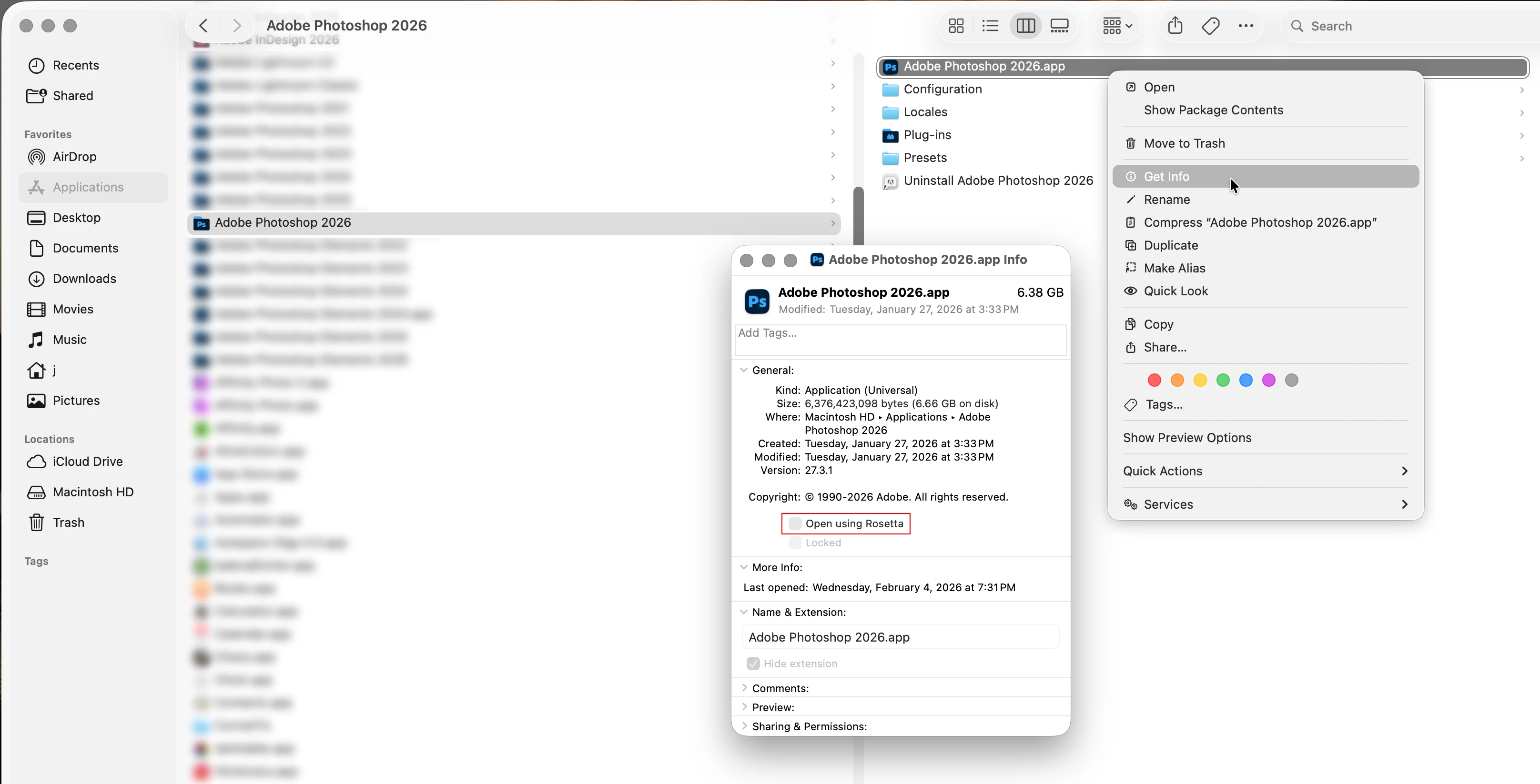
    Correct answer Jeff Arola

    If you go to Applications/Adobe Photoshop 2026

    and right click on the Adobe Photoshop 2026.app, then click Get Info do you see the checkbox for Open using Rosetta?


    2 replies

    creative explorer
    Community Expert
    Community Expert
    February 5, 2026

    @bugsizzy you need to use the Creative Cloud Desktop App to see the other and older versions. The online Creative Cloud does NOT show the previous versions. 

    I have to agree with ​@Jeff Arola — that’s exactly where you can set up the ‘Rosetta’ or even turn it off! 

    m
    Jeff Arola
    Community Expert
    Jeff ArolaCommunity ExpertCorrect answer
    Community Expert
    February 5, 2026

    If you go to Applications/Adobe Photoshop 2026

    and right click on the Adobe Photoshop 2026.app, then click Get Info do you see the checkbox for Open using Rosetta?


    bugsizzy
    bugsizzyAuthor
    Participant
    February 5, 2026

    Jeff, 


    Thanks very much for the visual. Because of that I was in fact able to find that check box and uncheck it and that solved the issue!

    Genius
    February 5, 2026

    This typically happens if you migrated apps from an older Intel Mac. You want to use the native Apple Silicon versions, not the older Intel code.