

Trevor.Dennis
Community Expert
Community Expert
June 17, 2026
Answered

Cancel Out of Dynamic Text

  • June 17, 2026
  • 2 replies
  • 30 views

I’ve come across this before but it was not a big deal and I ignored it.  Today it would useful if I could use the same text box multiple times.  I would like to be able to control how the Dynamic Text is going to look, so I’d like to turn the copied Dynamic Text layer back to an old fashioned text box.  I have seen a reference to using the Escape key, but that is not working for me.  I’d also like to adjust the line spacing to give that ‘y’ descender more space, but I am not working out how to do that.  
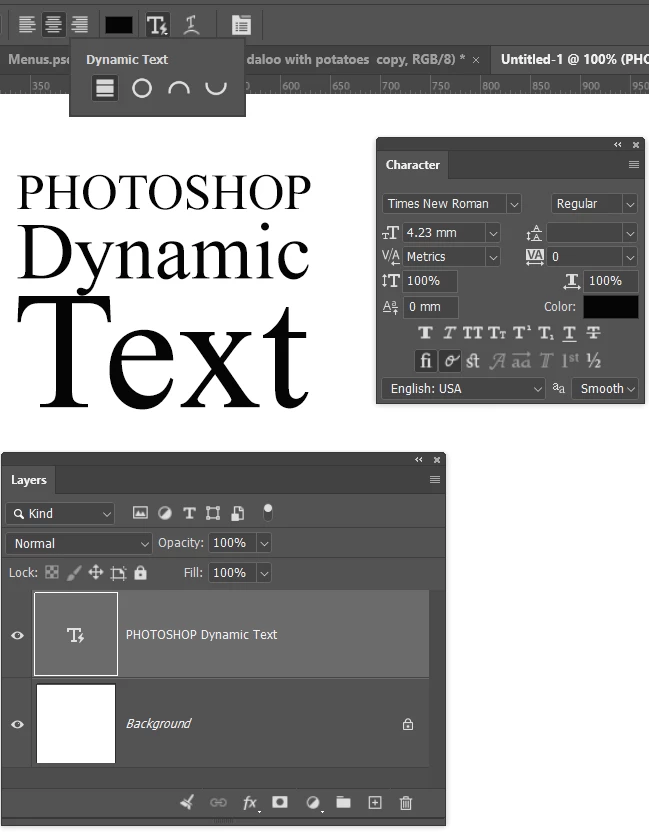
[EDIT] If it makes a difference, I nearly always use the beta version

    Correct answer Conrad_C

    You can revert a type layer back to normal type by deselecting whatever icon is selected for Dynamic Text. When no icon is selected, Dynamic Text is disabled.

    2 replies

    Conrad_C
    Community Expert
    Conrad_CCommunity ExpertCorrect answer
    Community Expert
    June 17, 2026

    You can revert a type layer back to normal type by deselecting whatever icon is selected for Dynamic Text. When no icon is selected, Dynamic Text is disabled.

    Trevor.Dennis
    Community Expert
    Community Expert
    June 17, 2026

    Yay!  That did it.  I thought I’d tried every permutation of icon pressing, but evidently not that one.  Thanks Conrad.  

    Trevor.Dennis
    Community Expert
    Community Expert
    June 17, 2026

    I’ve worked out a workaround for the line spacing. Hit Enter at the end of the upper line, and add as many spaces as it takes to give the required spacing.  I’ve used full stops in the example below for the sake of clarity.  The more spaces you add, the tighter the line spacing.

    I’m actually getting on OK editing the text while still in Dynamic mode, so not as big a deal as I was thinking.  I’d still love to know if there is a way of cancelling out of Dynamic text, and controlling line spacing without needing to trick it, if any has any answers.  ​@Pete.Green I love the look of Dynamic Text.  What would be really cool is an ability to have a dropped Capital like we can in InDesign.