


Known Participant
May 16, 2018
Answered

Cannot Make Selection of my path

  • May 16, 2018
  • 3 replies
  • 18715 views

I've opened an image and created a path (path 1) just like I've done hundreds of times.  With the pen tool, right clicked to "make selection" and nothing happens.  I did a tool reset, and did a PS reboot with CTRL/ALT/SHIFT and get a "No Pixles Selected" warning. 

If I create a new path, and trace out a 2nd shape, right click to "Make Selection" it works.  The 2nd path also looks different in the path window.  What did I do to case this issue? 
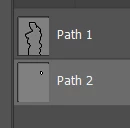
Any help is appreciated. 

    Correct answer jayb92535444

    Use the direct selection tool to select your path and move one of the points on the patch. What you may see is that you inadvertently duplicated the path and there are now two. Delete one of them and your path preview will show as filled in white... good to go!

    3 replies

    Participant
    August 28, 2025

    The no of paths you draw in photo shop,  that much of layers will be created. Each path will be shown on selection of that layers. In case, the second path it seems that the path is limited to one anchor point,generated with one click with mouse button. And hence could not show the selection.

    jayb92535444
    jayb92535444Correct answer
    Participant
    August 19, 2021

    Use the direct selection tool to select your path and move one of the points on the patch. What you may see is that you inadvertently duplicated the path and there are now two. Delete one of them and your path preview will show as filled in white... good to go!

    Inspiring
    July 21, 2023

    Never had this happen before, but this just solved it for me. Thanks.

    Participant
    May 16, 2018

    Did you try command clicking they shape layer (in the image preview area)? Also it looks like your path is not a closed path so you will likely get a straight line going across the 2 endpoints of your path to create and close the selection

    fetanugsAuthor
    Known Participant
    May 16, 2018

    I don't understand your "command click" instructions.

    As far as I know the path is closed.  When I click the path with the pen tool this is what I get.

    Participant
    May 16, 2018

    I should have said "Control-Click" since you are on a PC. If I had to guess, I would say you may be in "Quick Mask" mode which can be toggled on/off below your tools panel on the left-hand side below your foreground/background colors (it looks like a box with a dotted circle in the middle). Did you try control-clicking the shape layer (in the image preview area)? It looks like your path is not a closed path so you will likely get a straight line going across the 2 endpoints of your path to create and close the selection.