
iamdot1997
Participant
November 6, 2019
Answered

Cannot open Photoshop 2020

  • November 6, 2019
  • 13 replies
  • 35180 views

Photoshop 2020 does not respond at the initial launch after installation. The software freezes when the introduction window of new features appears.


I end the software by stoping it in Task Manager and it happens again when I start over. 


I tired both restart my computer and reinstall the software several times but not helping.


I am using the latest version of Windows 10. Please help me I need to use it ASAP. Thank you!
This topic has been closed for replies.
Correct answer

Hi

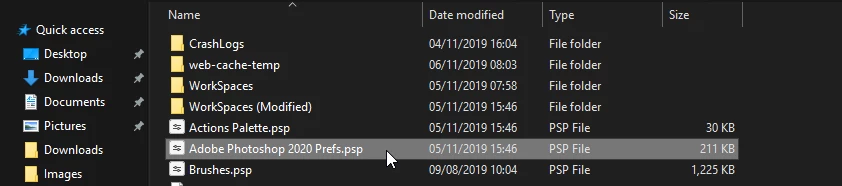
Try deleting the Photoshop preference file from this location

C:\Users\yourname\AppData\Roaming\Adobe\Adobe Photoshop 2020\Adobe Photoshop 2020 Settings


13 replies

Participant
December 19, 2020

I am photo shoot want to👆

Participant
October 25, 2020

Everytime i open Photoshop, it says something about scratch disks. How do i fix this problem?


October 26, 2020

How much free space do you have for the scratch disk

Participant
October 26, 2020

It says I have it full, and I can't seem to be able to change this coming up despite different attempts getting rid of it.

Participant
July 28, 2020

I tried all this. None of it worked for me. I found out at the link below, that I had to install Visual C++. installed, rebooted, now Photoshop opens.

https://community.adobe.com/t5/photoshop/photoshop-2020-does-not-start-no-error-nothing-in-task-manager/m-p/11320432?page=1#M351137

Participant
June 5, 2020

I can't open Photoshop 2019 or 2020, also can't open Creative Cloud. I have tried everything on this page, I can't even uninstall Photoshop or Creative Cloud on my Windows 10 computer. Please help!!!!

Participant
May 11, 2020

I tied to download the free trial Adobe Photoshop. It started then stopped. How do I get it to download?

Participant
January 28, 2020

Ive tried deleting the adobe prefences. Even deleting creative cloud and still not opening. It just freezes. I even had apple support try to figure out and they gave up. Actully notihing in my creative cloud opens. Is there any way i can get help. 

Participant
January 16, 2020

For all those who are able to install it successfully, but, the app closes on opening:

You’ve to install the Creative CLoud Desktop App and sign in into it. Then, it will work. This is needed for some reason by Photoshop and Illustrator. All other apps are working fine.

you're welcome

tigrezzs12713400
Participant
January 16, 2020
Thanks Issue cleared up
Participant
December 24, 2019

work for me. thanks!

shame adobe

Participant
December 19, 2019

o meu  tambem nao esta abrindo apenas aparece a imagen na camada mas na tela não aparece  ja desinstalei mas nao vai 


April 16, 2020

oh por fin! Thank you so much!

christopherc16131620
Participant
December 14, 2019

This did not work for me either.

After updating to Version 20.0.2, Photoshop will not start up from either the CC Desktop Controller or the Desktop shortcut.  The start-up screen frame comes up blank & the "wait" icon just spins & spins forever.

It will start up only  a.) when clicking on a file from Bridge 2020, or  b.) when clicking on a File Name in the Windows file menu.


Participant
January 11, 2020

Doing better thn me then - I can't get it to get pas the Adobe screen no matter what I try. Does the launch, shows me the mermaid, then a white screen in which the Adobe logo displays for a second or so then goes white and spinning wheel of death.

Participant
January 11, 2020

HI did you find any solution yet? I'm having the same problem