
Participant
December 16, 2024
Question

Cannot use custom brush with pencil tool?

  • December 16, 2024
  • 2 replies
  • 167 views

Hello,

I have a custom brush preset that's about 4x4 pixels large, meant to be used with the Pencil tool. It works fine while the brush tool is selected:
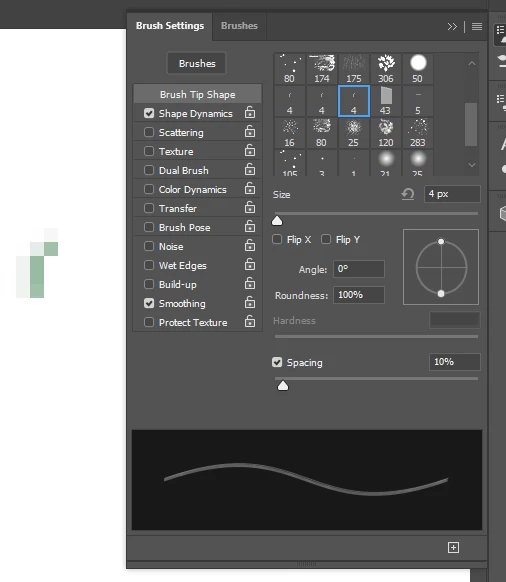
But does nothing when switching to the pencil tool:
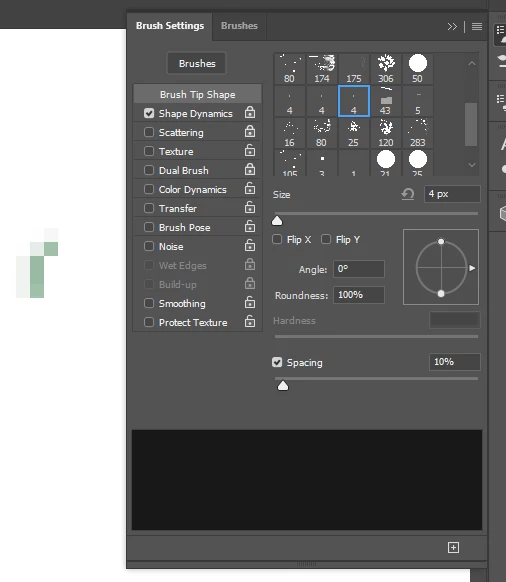
I've done some research on this already, and the only advice I've been able to find so far is defining it specifically as a pencil preset. I followed the steps with no results. Any other suggestions would be very appreciated. Thanks in advance!

This topic has been closed for replies.

2 replies

Trevor.Dennis
Community Expert
Community Expert
December 17, 2024

The lighter tones in the brush preset are 'anti aliasing' and they soften the edges of a brush stroke to make it look smooth.  The pencil tool can not do anti aliasing. 

That's why diagonal strokes with the pencil can have 'jaggies'.

The two strokes below are both 30 pixel fully hard zoomed in about 1000%

The upper stroke was done with the brush, and the lower stroke the pencil

If the preset you are using is from one of the standard groups, then if you could show us what group it came from, we could see exactly what is going on.


Bojan Živković11378569
Community Expert
Community Expert
December 17, 2024

Can you capture the entire window so we can see the Pencil settings in the Options bar? What blend mode and Opacity settings are applied to the Pencil tool?


I have no problem using any preset with the following method: activate the Pencil tool, then Ctrl + Alt + click on the brush preset in the Window > Brushes panel.