

user82573258
Inspiring
November 19, 2022
Answered

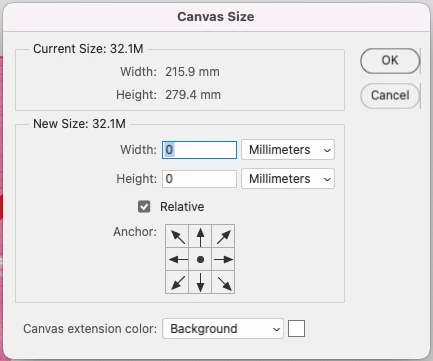
Canvas size stating '0x0'

  • November 19, 2022
  • 1 reply
  • 1461 views

V 24.0.1

I'm running it on a 2018 Mac Mini


I also had this problem before updating PS... but whenever I go to view / change my canvas size, it tells me the document is '0 x 0'


This happens regardess of which file I try it on. If I try to change the canvas size to the size it is currently (or any other size), it just goes with a completely different size and messes things up.
 

This topic has been closed for replies.
Correct answer jane-e

@user82573258 


Uncheck "relative" and you will see the entire canvas size.


See Julieanne's blog post for details:

https://jkost.com/blog/2018/09/3-2-1-photoshop-five-ways-to-change-the-canvas-size-in-photoshop-cc.html


Jane


1 reply

jane-e
Community Expert
jane-eCommunity ExpertCorrect answer
Community Expert
November 19, 2022

@user82573258 


Uncheck "relative" and you will see the entire canvas size.


See Julieanne's blog post for details:

https://jkost.com/blog/2018/09/3-2-1-photoshop-five-ways-to-change-the-canvas-size-in-photoshop-cc.html


Jane


Participant
July 4, 2024

Thank you.