
Inspiring
July 1, 2020
Answered

CC 21.2.0 File > Place Embedded works differently ?

  • July 1, 2020
  • 1 reply
  • 1942 views

Just upgraded to the June release of CC2020.


I have an issue when using File > Place Embedded to import a .png asset into a design. If I open the Smart Object Layer and add a new Layer within it, Photoshop throws a warning error when I try to save it back to the project:
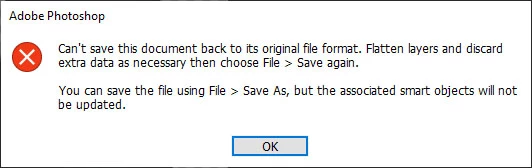


The document tab for the Edit Contents Window is a .png, rather than .psb that I'm used to seeing, hence the issue with saving it when I've added a Layer. In previous versions, when the embedded object was converted to a .psb I could toss as many Layers into it as needed, which was really useful.


Is this just a new feature change or an issue that is noted ?

This topic has been closed for replies.
Correct answer Bojan Živković11378569

Its not new bahavior. I am checking with CS6 and everything works exactly as you described.

PSB layer will be created if you convert content to SO layer. So, place content, rasterize then convert to SO layer and edit, that is work around which comes to my mind. You can record action for that task.

1 reply

Bojan Živković11378569
Community Expert
Community Expert
July 1, 2020

Its not new bahavior. I am checking with CS6 and everything works exactly as you described.

PSB layer will be created if you convert content to SO layer. So, place content, rasterize then convert to SO layer and edit, that is work around which comes to my mind. You can record action for that task.

simo.bAuthor
Inspiring
July 1, 2020

Scrub my first post, you're right Bojan. Having a brain fade today ;¬)

JJMack
Community Expert
Community Expert
July 1, 2020

Place will create the smart object layer's  object from the image file being place in the Embedded object  will contain a copy of the image file being "Placed".  If you open the smart object add a layer try to save the work file and it was a Jpeg file  you will get that message you showed.  If  you use save as to save a layered file you are not saving Photoshop temp Smart Object work document. Photoshop would not update the layers smart object.  You need to flatted and  use Save not use Save As.   I found that out when I was scripting  populating  Mockup templates via open smart object.  In fact I had to catch many things.  First could Photoshop edit the object temp work file. RAW files would open in ACR not Photoshop vector Objects would open in AI not  Photoshop.   The scripts can not handle smart object that are raw or vector objects via open object. Script can use replace content for those objects  not open object. 

JJMack