
MichaelCluff
Participating Frequently
June 17, 2015
Answered

CC2015 Error on PC: "Something went wrong initializing Creative Cloud Libraries" - how to repair?

  • June 17, 2015
  • 38 replies
  • 27184 views

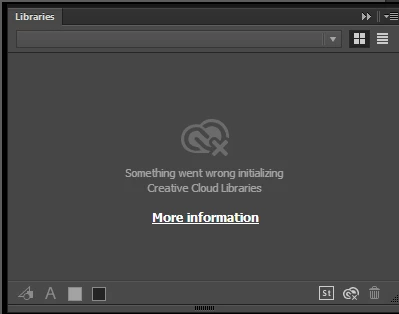
Upgraded all of my apps to CC2015, but when trying to use the Libraries features I get the error (pictured below): "Something went wrong initializing Creative Cloud Libraries".


The tooltip over the Creative Cloud logo says "Failed to Initialize." While the "more information" link (Creative Cloud Help | Creative Cloud Libraries) redirects to the generic Libraries Help.


How to repair? So far this is the case for Illustrator and Photoshop on my PC. (This is not a problem on my Mac.)

This topic has been closed for replies.
Correct answer danny_jack_johnson

This worked for me. With Photoshop or Illustrator running (If on a mac), go to your activity monitor and look for CCLibrary. Click the X to stop the the service, it will automatically restart and your library will reappear.

38 replies

SmartGraphicArt
Inspiring
July 29, 2016

Re-launching CC from the CC desktop app worked for me.  Refer to: Solution to the issue: Adobe Creative Cloud Libraries panel doesn't load in desktop products

Participant
October 30, 2015

Hi,

I too have been experiencing issues with my Creative Cloud Libraries (malfunctioning in all adobe CC2015 programs on both my MacBook Pro and iMac). I have been persisting to get this issue resolved for at least a month now, only to hear back from the adobe team that there is nothing they can do since they claim that this problem hasn't come up before. I strongly suggest that if any of you have similar issues with Creative Cloud libraries to get on to the Adobe team and urge them to get this issue resolved. Is anyone else experiencing an error message on your account portals under Assets/Libraries as well as in applications themselves?

Darold
Participant
October 14, 2015

Same problem on my Mac.

It worked, then stopped working, and now I can't get it to work anymore.

So frustrating. Why can't the libraries work without a connection and synchronize when a connection can be made. Arg.

gener7
Community Expert
Community Expert
October 14, 2015

If you need this problem addressed, open it as a new topic in the forums. This discussion had been marked answered and is just for reference.

Read this guide before posting. ASK- Forum Success Guide: Efficiently using the forums

Participant
October 1, 2015

I've been trying to fix this issue for about a week.  I've tried everything in this post as well other things.  Adobe support has taken control of my computer twice for about 2 hours each time to no avail.  This started with the most recent updates.  Before that, Libraries worked great.  I'm really not sure what to do from here.  Adobe support seems to be out of ideas for me. 

Participant
September 22, 2015

If you modify or replace your hosts file, make sure the Name & Extension is set to just hosts and not hosts.txt

right click or ctrl click on your host file, go to get info and check by Name & Extension.

this solved my issue. (on mac)

Participant
October 1, 2015

I tried every other solution on this thread and this was the only solution that worked for me! Just deleted the .txt extension from my hosts file and immediately started working again. Thank you!

Sir-GEE-O
Participant
August 20, 2015

Thank you! That solved the problem right away.

Known Participant
August 15, 2015

I'm on a Macbook running Yosemite. When I try tp force quit the "CCLibrary" in my activity monitor, it goes away for a second and then reappears. Any suggestions on why this would be happening?

gener7
Community Expert
Community Expert
August 15, 2015

It's supposed to. The restart should get the Library Panel working.

Known Participant
August 15, 2015

It's very strange. It won't quit for some reason and I'm not sure what to do.

Known Participant
August 11, 2015

On Win7 Pro. Updated Indesign to 2015. Got the 'something wrong' library thing going. Tried closing libraries in task manager. Signed out of Adobe and re-signed in. All other apps (PS, AI, DW) are older versions.

WAIT: Ok so I killed CClibraries while running Indesign and that seems to have reset it...

Do I even need the CC libraries panel to work in order to use any CC2015 apps?

ruthf50388300
Participant
August 11, 2015

@charlene
You don't need them to use the CC programs. It's just a handy option for often-used graphics (like logos) or even text that you use frequently and if you'd like a graphic to be easily accessible from all your CC programs. Hope that makes sense.

To everyone: I've noticed that I need to repeat the process of killing the CCLibraries process periodically. It's not a permanent fix, unfortunately. Until we get an update that fixes the issue, this works as a stop-gap measure.

I'm happy that my instructions for the fix for Windows helped people. It's my pleasure!

Aleksei_Segodin
Inspiring
August 11, 2015

Had the same problem just now (on Mac). But the hosts file was ok — it didn't contain any "adobe" lines in it.

What I did is added 127.0.0.1 activate.adobe.com to hosts file, then rebooted computer. After reboot I deleted this line from hosts and rebooted again. And after that opened Photoshop and noticed that everything is ok now.

From the point of view of common sense it has no sense. But it helped

sleepingcatnz
Participating Frequently
August 5, 2015

Quitting CCLibrary - CPU tab in Activity Monitor restores the Libraries panel info in Illustrator CC 2015on PowerMac running OS X Yosemite (10.10.4) Not sure for how long tho... Hope this helps others. Adobe can you please fix this bug ASAP?