Participant
April 24, 2019
Answered

Change Cursor to Dot

  • April 24, 2019
  • 4 replies
  • 2494 views

I really need to change the brush and eraser cursor to a dot. The standerd customization is not enough, I just need a dot (i use very small curosr and i need to get rid of the cross that appears). Please tell me there is a solution, I'm not afraid to change same codes or icons file inside the program. Big thanks.

Correct answer Trevor.Dennis
quote

Sorry to be 4 years late to the party but can you force LN to change the Eraser cursor as well as the brush tool? It disables on the eraser tool for me and I swear there was a way of changing the Eraser cursor as well but I just can't seem to find how. 


By @Umar257556788l7g


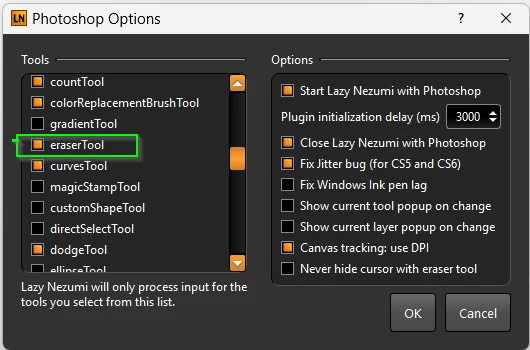
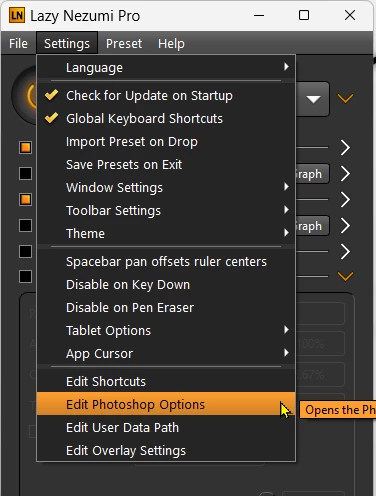
You can control which Photoshop functions LNP will process or ignore.

AFAIK all LNP settings will be applied to all enabled tools.


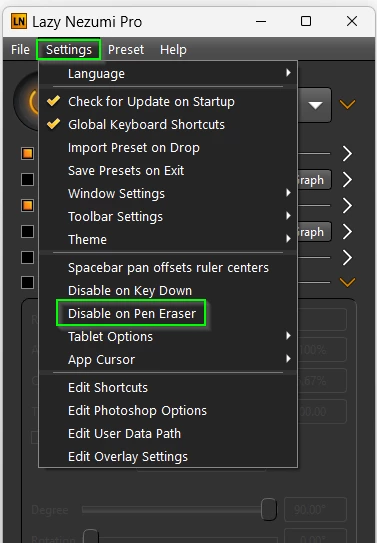
I think you would also need to make sure this setting is not checked if you are using the eraser end of a tablet stylus.
 

You can email Guillaume at any time.  I once emailed him with a question on Christmas day (my wife was on duty at the local hospital, and I was home alone 😞 ) and got a reply within the hour!  He is super helpful.


4 replies

Trevor.Dennis
Community Expert
Community Expert
April 13, 2021

If you are using a Windows system then Lazy Nezumi Pro has that feature.  I am forever telling people that LNP is the single most useful add-on for Photoshop as it has so many features, and at $35 it is a steal.  Unfortunately there is no version for Macs.

Torsten.H
Inspiring
April 13, 2021

I'm an idiot^^ I bought Lazy Nezumi a few years ago and completely forgot about it. I just renewed and installed it. Problem solved...many thanx....!!

but....

.....it's sad that such a simple function can't be set by default in ps

Torsten.H
Inspiring
April 13, 2021

Hello,

this posting is a bit older but I have the same problem an would like to habe a single Dot instead of a crosshair in PS. I hate to paint with the crosshair and all the other standard possibilities. Due to this Problem I use "Clip Studio Paint" for drawing an painting. In this Program choosing a Dot is a standard Feature. I really would love to use PS for my paintings...but the missing Dot always stops me using it.


Is there a solution for this problem in the meantime?

c.pfaffenbichler
Community Expert
Community Expert
April 24, 2019

You can post a Feature Request over on

Photoshop Family Customer Community

Sahil.Chawla
Adobe Employee
Adobe Employee
April 24, 2019

Hi there,

As you want to change the brush & eraser cursor inside Photoshop, please go to Photoshop's Preferences > Cursors and choose Normal Brush tip then Click on OK.


Please let us know if it helps.
Regards,
Sahil

RoashAuthor
Participant
April 24, 2019

That's the standard icon i use, but I gets really annoying when you use a very small brush tip and the cross outside the preview appears. I just want a dot, with no preview of the brush. A single dot, nothing more. I tried to change some svg files i found inside the program, but it didn't work.

Many Thanks.

Participant
December 27, 2019

This is such an important and simple detail.  I wish there was a way adobe!  I need it in illustrator  - a simple dot - not an "X" blocking my work.  Please add this feature today. 

Happy Holidays