ultrachrome
Inspiring
January 21, 2019
Answered

Changing deeper shortcuts not in the shortcut editor?

  • January 21, 2019
  • 2 replies
  • 895 views

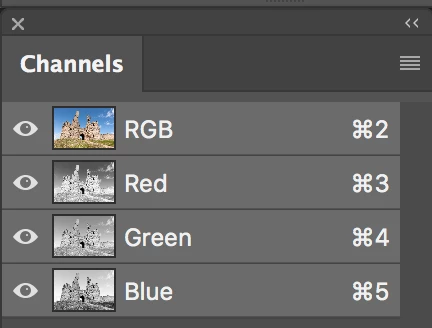
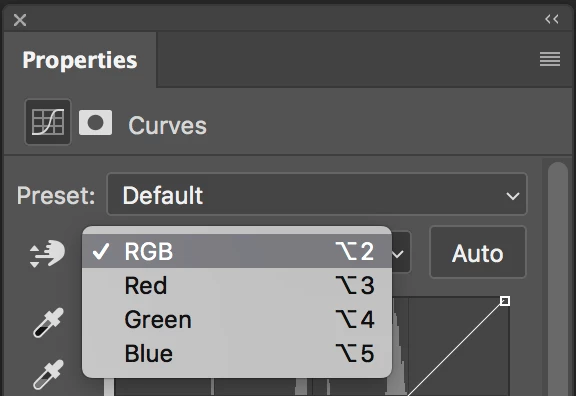
I want to change the shortcuts to the individual color channels within the Curves tool. Right now it's command 2,3,4 & 5 to get to all, red, green blue respectively. I use these so frequently that I need to sacrifice other shortcuts in order to get them to easier keystrokes but I can't find how to edit them.

Thanks!

Greg
    This topic has been closed for replies.
    Correct answer jane-e

    Hi ultrachrome

    I don't think these can be changed, at least not out of the box.

    But notice that the shortcuts for the Channels in Curves match the shortcuts in the Channels panel with the exception of Option vs. Command. So for me, having them match is a bonus — that doesn't mean it works for you, of course!

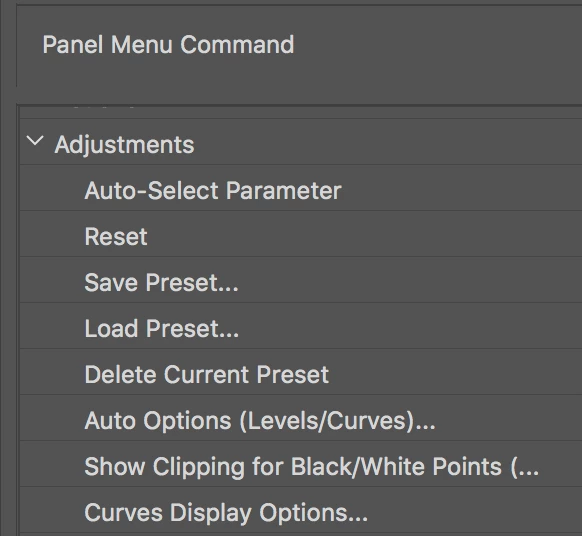
    If it could be done, it would be in Edit > Keyboard Shortcuts > Panel menus > Adjustments

    2 replies

    Trevor.Dennis
    Community Expert
    Community Expert
    January 21, 2019

    As far as I know, those shortcuts can't be changed for some reason.    To make it easier than Cmd 2 etc. you'd need a single key solution, and you could do that with an Action.  I am not sure if we have always been able to use a Function key without a modifier to trigger an Action, but we can now.

    You'd be sacrificing the default shortcut, but I find I don't miss them

    F2 Cut

    F3 Character Panel

    F4 Adjustments Panel

    F5 Brush Panels (I actually do like to use this one, but could live without it)

    F6 Colour Panel

    F7 Layers Panel

    F8 Info Panel

    F9 Actions Panel

    F10 History Panel

    F11 Timeline

    F12 Revert  (too dangerous to trust to a single key IMO)

    If you like the idea of single key shortcuts, another option is to use a Gaming keyboard with programmable keys.  I use a Logitech G910 keyboard that has three banks of nine G-keys.  They are context sensitive (least ways they are with Logitech's new G-Hub control software) so you could set a single key to produce Cmd 2, etc.  You can program a long shortcut directly to a G-Key.  I love this functionality, and would hate to be without it now.

    ultrachrome
    Inspiring
    January 21, 2019

    I've wondered...(but not to the point of checking with the company yet) if they could be assigned to something like a Palette control Surface.  Interesting idea about the gaming keyboard...Haha...just when I got my beloved mac keyboard to function like a Mac keyboard on a PC computer

    jane-e
    Community Expert
    jane-eCommunity ExpertCorrect answer
    Community Expert
    January 21, 2019

    Hi ultrachrome

    I don't think these can be changed, at least not out of the box.

    But notice that the shortcuts for the Channels in Curves match the shortcuts in the Channels panel with the exception of Option vs. Command. So for me, having them match is a bonus — that doesn't mean it works for you, of course!

    If it could be done, it would be in Edit > Keyboard Shortcuts > Panel menus > Adjustments

    ultrachrome
    Inspiring
    January 21, 2019

    Thanks Jane-E...It's that I use these so often and it's a bit of hand contortion but I guess it's not often enough accessed to make it to the shortcut editor.  I get the logic of it, but I would sacrifice the tool opacity shortcut to turn 2,3,4 and 5 without the command key into my curves channel keys. Not for everyone for sure. 

    Weird that if you make a Curves adjustment layer that the shortcuts required in the curves layer uses the option key instead of the command key.

    Conrad_C
    Community Expert
    Community Expert
    January 21, 2019

    ultrachrome  wrote

    Weird that if you make a Curves adjustment layer that the shortcuts required in the curves layer uses the option key instead of the command key.

    It isn't weird, it's to give you more keyboard control over what is being edited. When you use the Option key, you're changing the curve being edited. When you use the Command key, you're changing the channel being edited. Since they're different things, they should use different keys.