Participant
November 29, 2025
Answered

Changing default profile from Adobe Color in ACR

  • November 29, 2025
  • 3 replies
  • 300 views

Hi,


I'd like to change the default profile in ACR from Adobe Color to Adobe Standard. I know that the Defaults dialog box gives you the option to change the default to any other installed profile, but it doesn't give you the option to change the Adobe default. It seems you're stuck with Adobe Color.

Am I missing something?


Thanks

Correct answer D Fosse

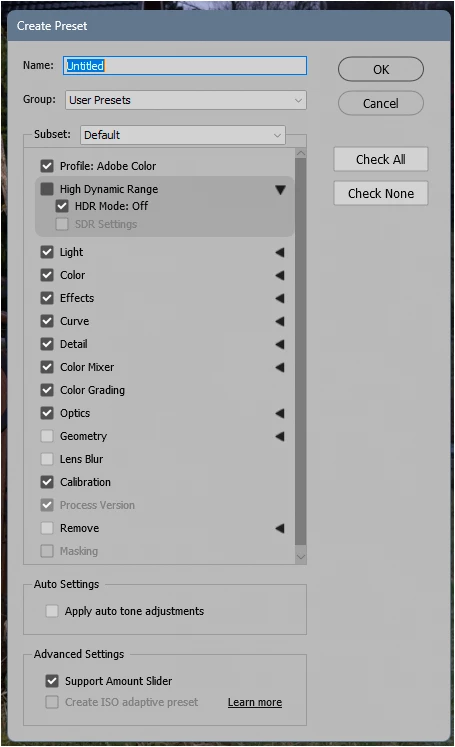
It should be possible. What you need to do is to first make a preset using this profile. Then you can use this preset as default. 

https://helpx.adobe.com/camera-raw/kb/acr-raw-defaults.html 


866814i4B1FCB0104DE1DAF.png


3 replies

NB, colourmanagement
Community Expert
Community Expert
November 29, 2025

@StuartKane Hi, please add a screenshot of the offending ACR dialog box to your reply.

There's an image icon above the text box when replying. It's best to use that to post the image inline 

Maybe explain why tyou want to make that change also 


I hope this helps

neil barstow colourmanagement - adobe forum volunteer,

colourmanagement consultant & co-author of 'getting colour right'

See my free articles on colourmanagement online

Help others by clicking "Correct Answer" if the question is answered.

Found the answer elsewhere? Share it here. "Upvote" is for useful posts


Participant
November 29, 2025

Hi Neil,


I want to change the Adobe default profile to Standard from Color, because I find that Color has too much contrast and saturation. Standard is a better starting point for most of the editing I do.


In the Raw Defaults box (image 1) You have the options for Adobe default, Camera settings, or Choose preset.

If you click Choose Preset, you can then scroll down to Default, but that only gives you a choice of Default, or some of the other Adobe presets, with some adjustments already made.


There is no option to choose any of the Adobe profiles, except Default, and no way to change what "default" is.

D Fosse
Community Expert
D FosseCommunity ExpertCorrect answer
Community Expert
November 29, 2025

It should be possible. What you need to do is to first make a preset using this profile. Then you can use this preset as default. 

https://helpx.adobe.com/camera-raw/kb/acr-raw-defaults.html 


866814i4B1FCB0104DE1DAF.png