Participant
July 23, 2025
Answered

Changing Language in Photoshop for iPad

  • July 23, 2025
  • 2 replies
  • 309 views

Hello Adobe team,


I’m a professional 3D visualizer and have been using Photoshop for over a decade. I’ve recently started working with the iPad version and was very surprised to find that I can’t manually change the language of the app.


My iPad system language is Ukrainian, and region is Italy — and as a result, the app defaulted to Italian, which I don’t use professionally. I had to completely remove Italian from my iPad just to get Photoshop to work in English.


As professionals, we learn and use Photoshop in English. This is the global standard for tutorials, collaboration, and terminology across all creative industries.


The inability to manually choose the interface language slows down professional work and creates frustration.


Please consider adding a language switch inside the app, or at least allow us to override the system settings. This small feature would make a big difference for international professionals.


Thank you for your time and consideration.


[Subject edited by moderator. Was "Photoshop for iPad"]


Correct answer silk-m

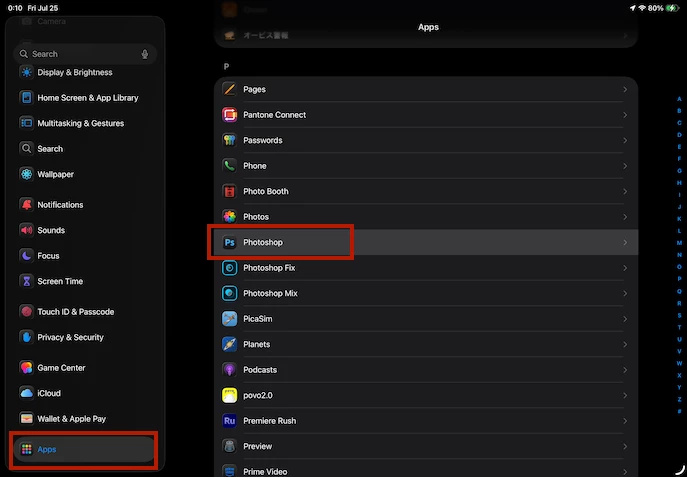
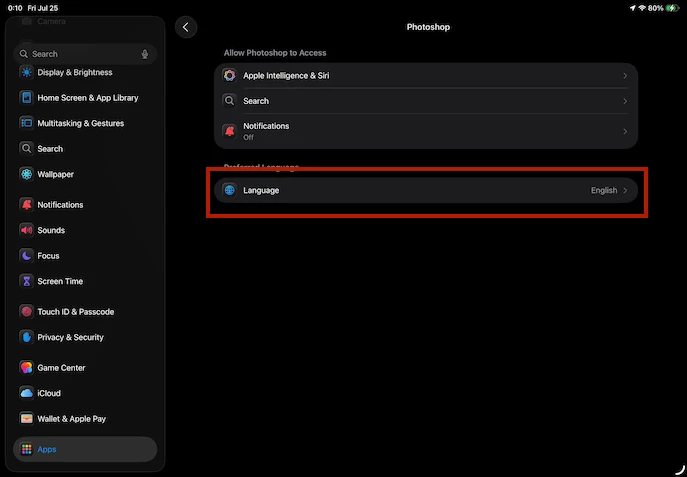
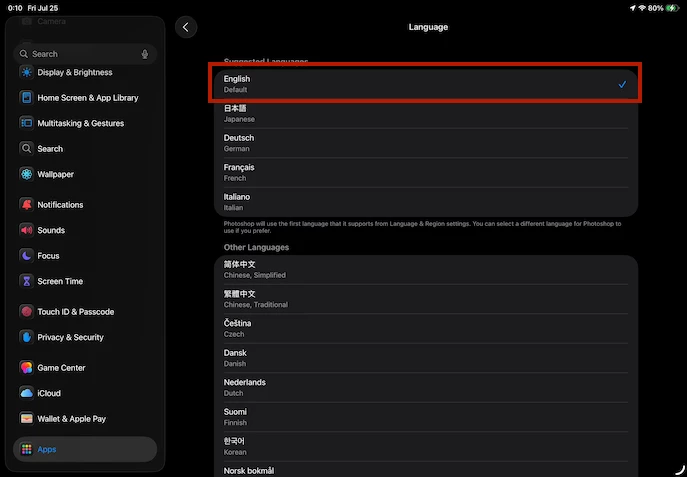
On an iPad, you can change the app language in the Settings app.


2 replies

silk-m
Community Expert
silk-mCommunity ExpertCorrect answer
Community Expert
July 24, 2025

On an iPad, you can change the app language in the Settings app.


--Susumu Iwasaki
Abambo
Community Expert
Community Expert
July 24, 2025
quote

On an iPad, you can change the app language in the Settings app.


By @silk-m

Interesting option!

ABAMBO | Hard- and Software Engineer | Photographer
creative explorer
Community Expert
Community Expert
July 24, 2025

@Anita_Morieva Based on Adobe's official support documentation and community responses, Photoshop on iPad currently defaults its language to match your iPad's operating system language. This has been their stated policy since the app's early days. If your iPad's primary language is Ukrainian and you have Italian as a secondary preferred language due to your region, the app will try to pick from that list, often prioritizing a regional language if it's available and supported by Photoshop, or simply the first one in your list that it recognizes.

I guess you could keep your iPad's primary language as English  (maybe inconvenient) which will  ensure Photoshop for iPad opens in English. You can still add Ukrainian and other keyboard layouts. Your region (Italy) will primarily affect things like date formats, currency, and App Store content, not necessarily the app interface language if your primary language preference is English.

m
Participant
July 24, 2025

Thank you for your response, but I’m afraid it completely misses the point.


I’m not asking how the app currently works — I already know it follows the system language.

What I’m asking for is a feature request: the ability to manually change the interface language inside the app.


Many professionals like me rely on English terminology, as that’s the language of the industry, the tutorials, and the tools we’ve been trained on.

Being forced to use a local interface (e.g. Italian), just because I live in that country, breaks my workflow.


Please escalate this as a feature request. This is not a question of support — this is a usability issue for professionals using Adobe tools internationally.