
Inspiring
February 11, 2025
Question

Check if the action has been selected

  • February 11, 2025
  • 2 replies
  • 281 views

I have a small uxp panel that allows me to select a set of actions and an action,
it works for my needs.
I would like to know if there is a way to check if the action has been selected,
so if the action has been selected an 'ok' warning appears
if the action is not selected an 'ko' warning appears.
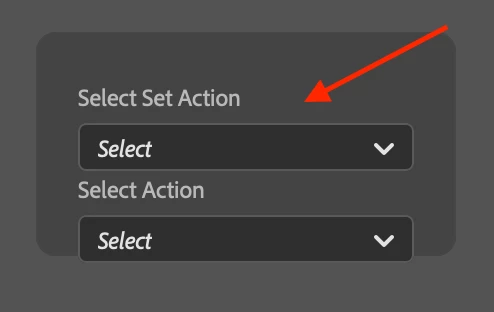


As always, I hope for your help.

2 replies

Legend
February 12, 2025

Photoshop does not seem to have a property to determine if an Action/ActionSet is selected. I checked this way.


However, batchPlay can get names of active action and its parent set, so it could be achieved by matching ID.

const { app, action } = require('photoshop') ;

const result = await action.batchPlay(
  [
    {
      _obj: 'get',
      _target: {
        _ref: [
          {
            _enum: 'ordinal',
            _ref: 'action',
            _value: 'targetEnum'
          }
        ]
      }
    }
  ], 
  
  {}
) ;

await app.showAlert(JSON.stringify(result, null, 2)) ;
/* -->
[
  {
    "name": "Vignette (selection)",
    "itemIndex": 1,
    "count": 11,
    "numberOfChildren": 7,
    "parentName": "Default Actions",
    "parentIndex": 1,
    "ID": 4
  }
]
*/
Inspiring
February 12, 2025

Thank you for the time you dedicated to me, now I'll see if I can adapt it.

creative explorer
Community Expert
Community Expert
February 11, 2025

@Ciccillotto if you are in UX, then, how can this be a better user experience? Hmmm...
• How would you know if it is selected? Maybe a different color 'toggle' state or 'on' state. 
• Maybe an effect that the button is selected with a 'pressed down' effect. 
Look at other applications (look at in light mode) because you might not see the effect in dark mode and you will see the different styling of the styles of knowing when a button is selected

m