
Participant
December 18, 2024
Question

Checkered bars appearing across open documents at random times

  • December 18, 2024
  • 2 replies
  • 406 views

I just updated to Seqioua 15.1.1 and now Photoshop 25 places grayed-out checkered bars across areas of the file at random times:
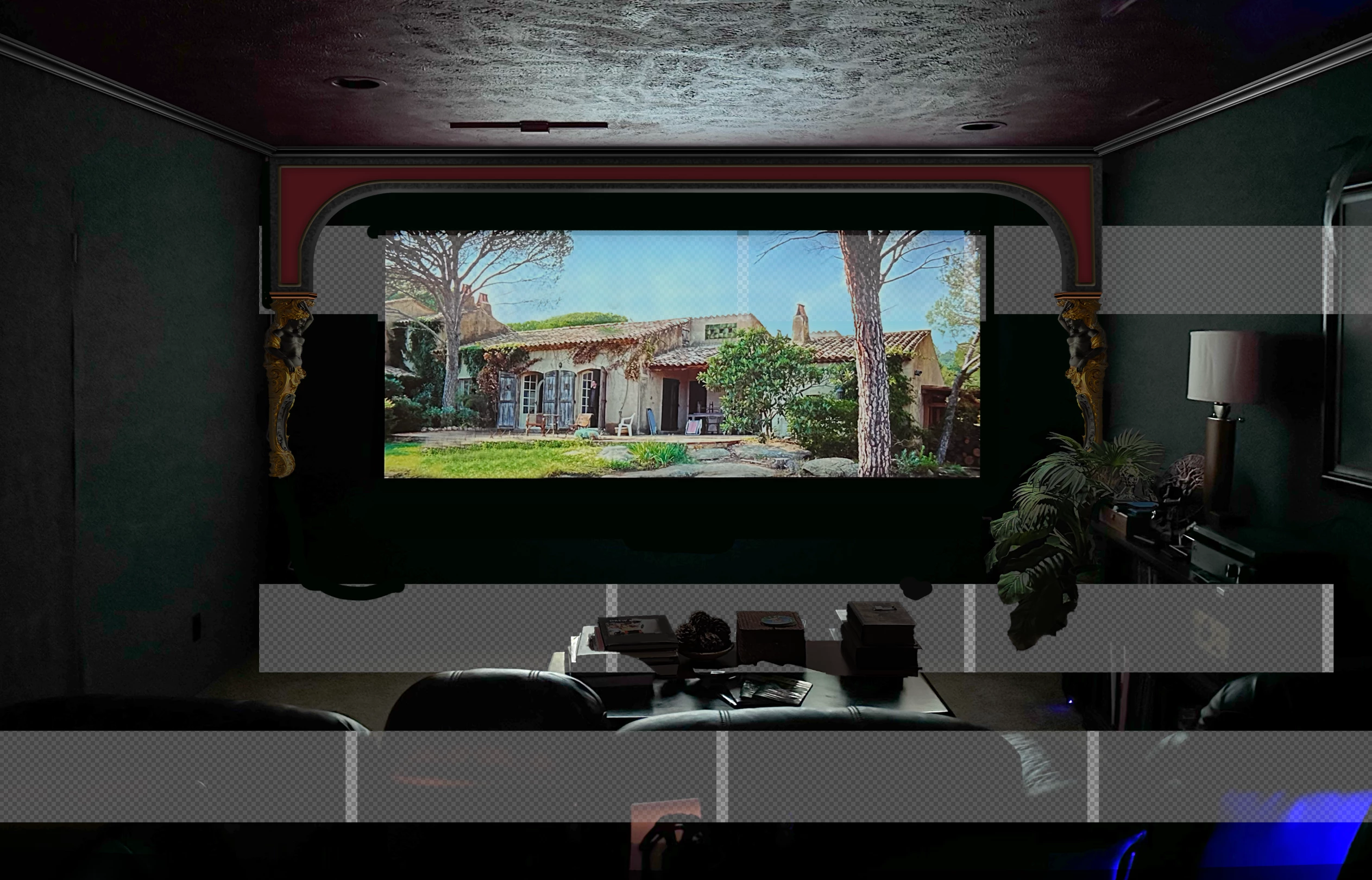
The bars are permanent and the layer is damaged. There's no going back. Quit and restart, and it's still there. The file is ruined.  I cannot reproduce the problem, so I have no idea what's causing it. Does anybody have any idea why this is happening?

2 replies

Participant
December 27, 2024

Thank you for your response! Sorry, I don't have the damaged file anymore. I found that if I duplicated the affected layer a number of times, and then merged them together, the layer looked normal again. The original file was a photo from my iPhone airdropped into my M1 desktop, then opened in Photoshop 25 to work on.


mglush
Community Expert
Community Expert
December 27, 2024

Hi! I just have a couple of questions for you! I realize that you solved the issue, but it would still be helpful to see why this happened. How long after you imported the photo did it happen? What did you do to change the imported image? Was it just one layer that was affected or did it happen to multiple layers?

Thanks for the extra info!

Michelle

Participant
December 27, 2024
Hi Michelle, To answer your questions - *How long after you imported the photo did it happen?* I opened the photo in PS 25 immediately upon importing. I'm working on an M1 Mac Mini. I just upgraded to Sequoia 15.1.1 a week ago. *What did you do to change the imported image? **Was it just one layer that was affected or did it happen to multiple layers?* I adjusted the brightness, contrast and saturation. I lifted parts of the image into several layers (which were not affected by the problem) and first noted the issue after working on the file for a couple of hours. (One of those, 'Oh, s**t!' moments) The issue only affected the photo I imported and was using as the background. At first, I thought it was a temporary program glitch, but when I saved and quit, then reopened the file, the gray bars were still there. I restarted the computer, opened the file again (and once more in PS Beta) and found the same problem. It was then I started playing around and eventually found a solution. It hasn't happened since. Weird, right? Are any other users having problems using PS 25 with Sequoia? At first, I thought that might be causing the problem because Photoshop has always been solid as a rock on previous systems. I'll contact you if it happens again and take more careful note of the circumstances. Hope this helps, Dean
BrettN
Community Manager
Community Manager
December 18, 2024

Hello! Sorry you are running into the behavior.  My first guess is there is some sort of corruption in the file, specifically the alpha channel, since you are seeing the checkerboard pattern.


What types of files are these? Is this a PSD? A raw file of some sort? Would you be able share a file so we could take a look?