
Answered
Clone Stamp issue

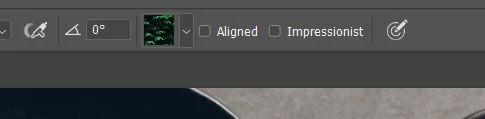 I have a problem with the clone stamp. I'm using PS 2020 on a PC. When I try to use the clone stamp, it has a selection of trees/leaves, so when I try to clone something I am painting in leaves. How can I reset this? The little box with green and black is the selection I'm talking about at the top of my toolbar. I have no idea how it got there. I was using it a couple of days ago without any problems. Any advice is appreciated.
 AdChoices