
Participating Frequently
December 13, 2023
Answered
Clone Stamp Tool duplicates the layer and moves around with the mouse
- December 13, 2023
- 2 replies
- 257 views
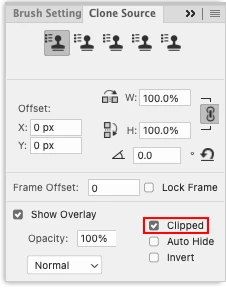
I have recently updated Photoshop 2023 and downloaded Photoshop 2024. In both versions, the Clone Stamp Tool is behaving very strange. I am able to select my source point using the 'Option' key but when I start using the brush it duplicates the layer on screen (but not in the layers panel) and moves it around the screen with the mouse cursor. I am therefore not able to use the tool as I cannot see where I am using the brush on my actual layer. When press the shortcut for the 'Move' tool (V), the duplicated layer disapears.
I have uninstalled Photoshop 2024 and reinstalled it but the same bug persists.
I am using a MacBook Pro 2021 model with the M1 Max chip and macOS Ventura 13.6.2.


 AdChoices