Known Participant
September 19, 2018
Answered

Clone Stamp tool not working

  • September 19, 2018
  • 4 replies
  • 62373 views

Suddenly when using the clone stamp it just doesn't work.

Is there something I can change to get it to work?

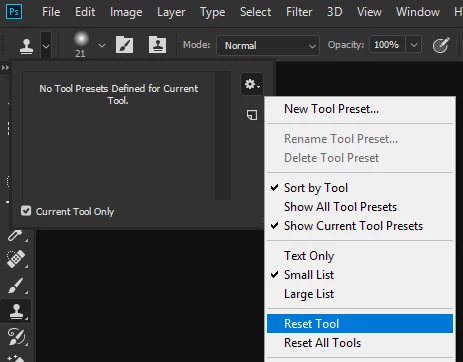
The screen shot shows where it is now.

Many thanks, Penni

Correct answer

hi

Have you tried resetting the Clone Tool

4 replies

Participant
October 1, 2022

Ok my clone tool is not working Ive tried the suggestion here and it still don't work. It lets me clone but it wont release it in the spot I want it. help please!

Participant
November 2, 2025

Was there ever an answer here? I know this is a frequent topic of discussion, but I haven't been able to find a fix. Elements 2022, Mac OS 15.7.1. Clone stamp tool alignment won't work. I reset tool, switched alignment on and off. Purchased, downloaded and installed 2026 "upgrade," which just seems to have switched my 2022 app over to a 3-year license. No relief! I have been using the clone tool for over a decade to modify images by cloning between layers, so I'm quite familiar with the layers issues. Any thoughts would be much appreciated. The issue began about a week ago, out of the blue. 

September 19, 2018

You're welcome

Participant
July 23, 2020

Hi,

Im having problems with my Clone Stamp tool in PhotoShop CC2017.
I'm working via a PC not a Mac.
When I Alt-Click to use the Clone tool on an image the brushes box pops up and the stamp itself doesn't work.
Anyone else had this problem? Is there a simple solution?

Thanks!

lisab50241878
Participating Frequently
August 17, 2020

I am on a Mac and mine isnt working either in Photoshop 2020.  It is making me crazy. 

Correct answer
September 19, 2018

hi

Have you tried resetting the Clone Tool

Known Participant
September 19, 2018

Thanks Ged for guiding me through this.

Legend
September 19, 2018

Something that trips me up when using the Clone Stamp tool,

Make sure you’ve selected the layer you intend to clone from and not the layer you wish to clone to.

See how below I have Layer 2 selected? As this is a blank layer if I attempt to use the clone tool, it won’t clone anything as there isn’t anything on this layer to clone from but I want the clone edits to be on layer 2 so I will need to selected layer 1 (or what you wish to clone from) then make create the clone (Alt+LMB) then reselect layer 2 and apply.

Seems obvious but it honestly gets me every time!

Participant
March 4, 2020

Thanks for your tip.  II was not selecting the source from the 1st layer and then switching to a new layer.