

Inspiring
December 1, 2025
Answered

Close keyboard shortcut

  • December 1, 2025
  • 3 replies
  • 417 views

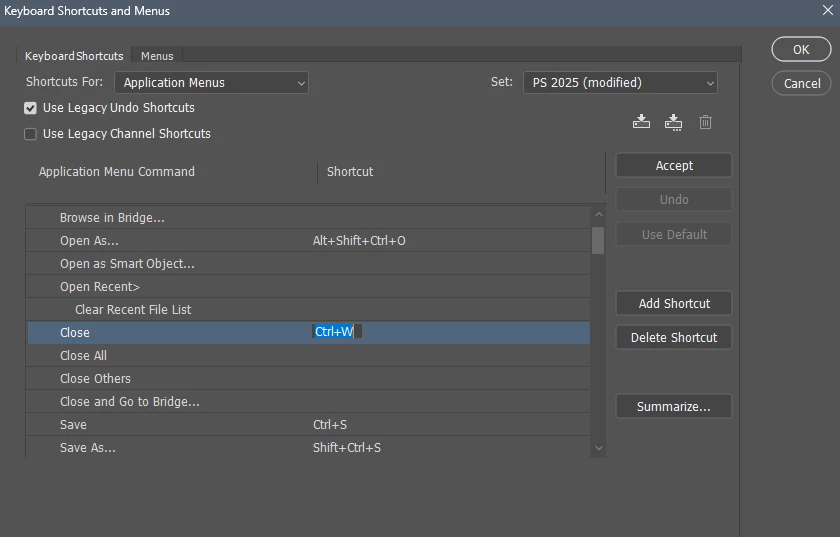
Why is CTRL F4 not down as Close in the list of keyboard shortcuts ? or preferences?
keyboard.jpg

Coz let's face it, that's what happens.



Correct answer D Fosse

@Ghoul Fool 


It's not a Photoshop shortcut; it's a Windows shortcut. It will close open documents.


(just tested it on a laptop that doesn't even have Photoshop installed).

3 replies

Conrad_C
Community Expert
Community Expert
December 2, 2025

I think it’s because Ctrl+F4, like Alt+F4 and Ctrl-Tab, is a system-level shortcut that works in all apps including the Windows Explorer desktop, and therefore Photoshop does not have control over that shortcut so it doesn’t list it.


There is a very long list of other similar standard Windows keyboard shortcuts that don’t appear in application-specific keyboard shortcut editors including non-Adobe apps. Those Windows shortcuts are defined at the system level. 

Inspiring
December 3, 2025

But you can't add a ALT TAB shortcut, but you can over-ride CRTL F4. Plus not everyone knows Windows keyboard shortcuts.


And going off at at a mild tangent: Don't even get me started on the whole Adobe to Windows to Wacom back to Adobe blame/pass the buck game.

But having some explicit documentation about what you can and can't over-ride would be nice. 

jane-e
Community Expert
Community Expert
December 3, 2025
quote

But you can't add a ALT TAB shortcut, but you can over-ride CRTL F4.

By @Ghoul Fool


We can't do either one.


So far only volunteers who are users just like you are on this thread, and Adobe does not let us make changes to the application.


Jane

Inspiring
December 2, 2025

At the risk of repeating myself to change a Discussion to an Idea:


Why is CTRL F4 not listed as a keyboard shortcut in Photoshop?


It closes the current document and if you're not aware of what it does, it can be let's just say a very sweary moment.


Answers on a postcard.


And I've already added a script to do nothing to over-ride it, just so it won't happen again.


D Fosse
Community Expert
D FosseCommunity ExpertCorrect answer
Community Expert
December 2, 2025

@Ghoul Fool 


It's not a Photoshop shortcut; it's a Windows shortcut. It will close open documents.


(just tested it on a laptop that doesn't even have Photoshop installed).

jane-e
Community Expert
Community Expert
December 1, 2025
quote

Why is CTRL F4 not down as Close in the list of keyboard shortcuts ? or preferences?

By @Ghoul Fool


Only Adobe knows for sure, the rest of us would be making guesses. My guess is that some keyboards don't have function keys and for those that do (most of them), the function keys have to be set on purpose to be Standard Function Keys. I use both Mac and Windows and on Day 1 of a new installation, I set the function keys to be Standard. Control/Command+W can be used by all, whereas Control + F4 is a Windows shortcut that has existed since at least Windows 2.0.


I followed your link and would expect to see this shortcut under the heading "Use Function Keys", but it's not there.

https://helpx.adobe.com/uk/photoshop/using/default-keyboard-shortcuts.html 


You might post an Idea instead of Discussion and ask for it to be included. Adobe staff reads those even when they don't reply.


Jane
