
Mary Louise Harris
Participant
Apr 27, 2019 9:21 PM UTC
Answered

Color and contrast shift from LR to PS??

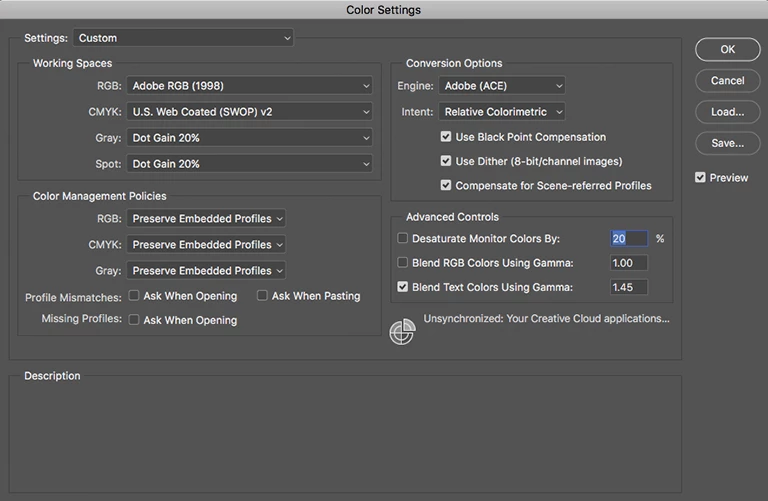
Hello! I've been using LR & PS on a single-monitor color-managed system for years, and I'm suddenly getting warmer, oversaturated and higher contrast images when I open files in PS CC 2019 from the desktop version of Lightroom CC 2015.14. I haven't changed my PS color settings, which are set to Adobe RGB color space and Preserve Embedded Profiles. The difference is still apparent when the edited image is saved and viewed in LR. See attached LR exports from DNG and edited TIF for comparison. (The shift is especially noticeable in the skin tones, hair and highlight values. It's also easily seen when comparing histograms in LR.) Also attached is a screen grab of my PS color settings dialogue. Does anyone know what is going on here?? Thanks in advance for the help!

ML

DNG ('original')

File opened and saved in PS

Color Settings
This topic is closed to new replies. Start a new post to keep the conversation going.
Per Berntsen
Per BerntsenCorrect answer
Community Expert
Apr 27, 2019 10:04 PM UTC

Your Lightroom is several versions out of date, so the first thing to do is to upgrade to the latest version, which is Lightroom Classic 8.2.1. There was a change in the default camera profile in Camera Raw/Lightroom some time ago, and having matching versions of Camera Raw in Photoshop and Lightroom may fix the issue.

LR Classic 8.2.1 and PS 2019 both use Camera Raw version 11.2.1.

If the CC desktop app doesn't show an upgrade for Lightroom, try signing out, and then back in.

There is also a slight possibility that your OS (you seem to be on a Mac) doesn't support later versions of Lightroom, but being a Windows user, I don't really know.

4 replies

Per Berntsen
Community Expert
Per BerntsenCommunity ExpertCorrect answer
Community Expert
Apr 27, 2019 10:04 PM UTC

Your Lightroom is several versions out of date, so the first thing to do is to upgrade to the latest version, which is Lightroom Classic 8.2.1. There was a change in the default camera profile in Camera Raw/Lightroom some time ago, and having matching versions of Camera Raw in Photoshop and Lightroom may fix the issue.

LR Classic 8.2.1 and PS 2019 both use Camera Raw version 11.2.1.

If the CC desktop app doesn't show an upgrade for Lightroom, try signing out, and then back in.

There is also a slight possibility that your OS (you seem to be on a Mac) doesn't support later versions of Lightroom, but being a Windows user, I don't really know.

Translate
D Fosse
Community Expert
Community Expert
Apr 27, 2019 10:24 PM UTC

I'd mark that as "correct", but not being a moderator I can't do that. So "helpful" will have to do...

Translate