

raghavg6463409
Known Participant
October 2, 2018
Answered

Color Changes

  • October 2, 2018
  • 5 replies
  • 3234 views

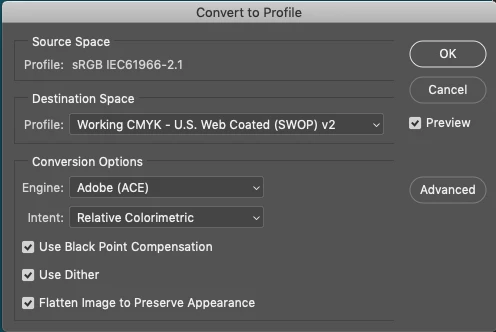
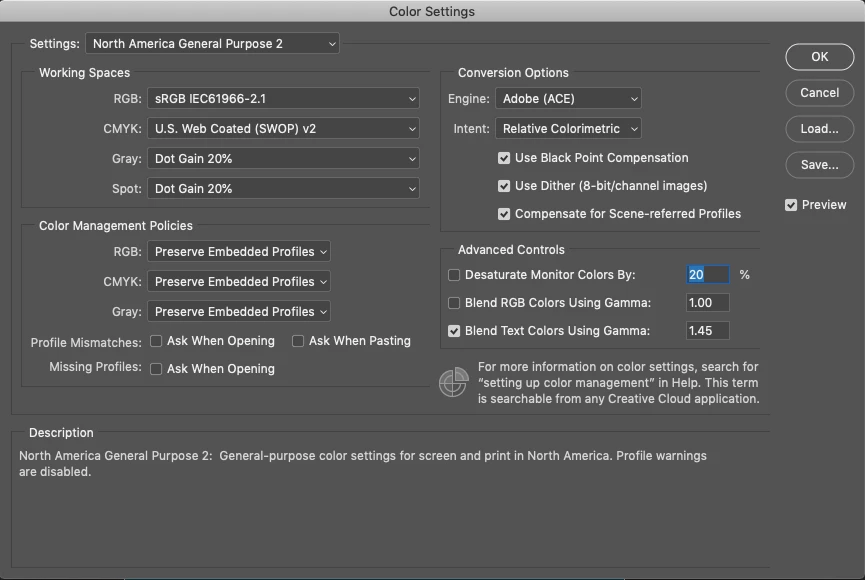
yesterday i reset my photoshop,but now when i edit any picture the color of image looks correct in imac but when i send that image to smartphone via bluetooth the color of that image changes please help,, below is setting of convert to profile and color setting.
This topic has been closed for replies.
Correct answer tom attix

The CMYK color space is for 4 color printing. Anything you create for IOS should be in an RGB color space. The correct profile is sRGB. So, in your case, your image was already in sRGB so conversion wasn't required. Try saving without the conversion and see if the image looks correct on an iPhone.

5 replies

raghavg6463409
Known Participant
October 5, 2018

that same issue i faced 4 months back but that time it will fixed in few days checkout this question Color changes

italosan
Community Expert
Community Expert
October 3, 2018

What steps do yo follow when you save the file?

Can you please show us the whole saving process?

raghavg6463409
Known Participant
October 4, 2018

simply save as jpeg.. i tried by creating new document with solid color and then write something>then send it to smartphone the color of image change little bit like dark green color shows little light green color in smartphone

Legend
October 4, 2018

Saving as JPEG isn't the whole process because there are a lot of options. What are ALL of the options you use when saving as JPEG?

italosan
Community Expert
Community Expert
October 2, 2018

As said before, anything you will use in whatever way on smartphone - but this is true for any digital (aka non-printed) purpose - should be treated in a RGB environment, because you don't expect any device to have a color manager that can interpret your CMYK and convert in a good way in RGB.

With that said, to solve your problem, you should just save the file in a usable file format (.jpg or .png will do best) and send it on the smartphone.

Also, due to your Color Setting, you will not be prompted with any alert when you open a file that doesn't match your working color space, so you could be end up working on a CMYK file without even knowing. To know the actual color mode of the file you are working on, go to "Image > Mode" and see if "RGB Color" is selected.

If not, you could convert the color profile via "Convert To Profile" [PLEASE DON'T CHANGE IT SELECTING IT DIRECTLY].

Hope this will help.

raghavg6463409
Known Participant
October 3, 2018

"Image > Mode" and "RGB Color" is selected....even i tried with lightroom but lightroom images looks good in smartphone

tom attix
Adobe Employee
tom attixCorrect answer
Adobe Employee
October 2, 2018

The CMYK color space is for 4 color printing. Anything you create for IOS should be in an RGB color space. The correct profile is sRGB. So, in your case, your image was already in sRGB so conversion wasn't required. Try saving without the conversion and see if the image looks correct on an iPhone.

raghavg6463409
Known Participant
October 2, 2018

but i have android

tom attix
Adobe Employee
Adobe Employee
October 2, 2018

sRGB should work for Android devices too.

D Fosse
Community Expert
Community Expert
October 2, 2018

This is why color management was invented. A phone is not color managed and doesn't care about color profiles.

Still, the immediate issue here is probably CMYK. Very few applications have proper CMYK support, and I can promise you that nothing on a smartphone will have the slightest idea what CMYK is.

CMYK is for offset print. Nothing else. If this file isn't headed for an offset press, don't use CMYK.

raghavg6463409
Known Participant
October 2, 2018

then which setting i have to use, before reseting photoshop.all images looks correct in smartphone but now its not correct..