
Participating Frequently
April 30, 2017
Answered

Color Dodge not working in Photoshop
  • April 30, 2017
  • 2 replies
  • 9846 views

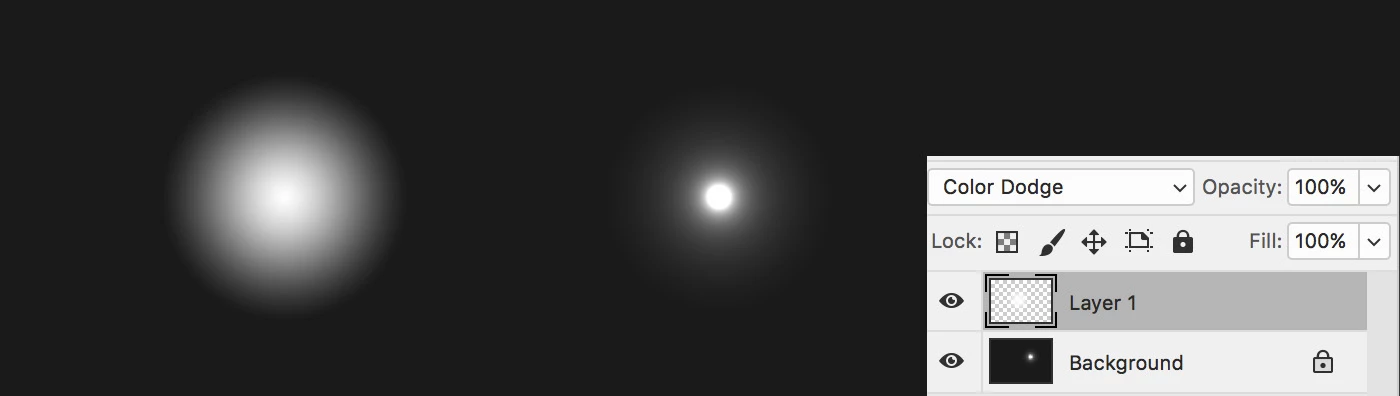
I've noticed the layers Color Dodge blend mode in Photoshop CC 2017.1 isn't working as it used to. For example in the graphic above, the white orb layer on the left is set to Color Dodge but appears the same as when set to Normal. It should look like the one on the right.

But when I use the white radial gradient tool (in Color Dodge mode) directly on the Background layer, it works fine! It also works fine in Illustrator.

Any thoughts?!
This topic has been closed for replies.
Correct answer Trevor.Dennis

2 replies

Participating Frequently
November 16, 2021

Hello.
I'm having the same bug.
Initially, this bug has been occurring since Photoshop 2015.5.
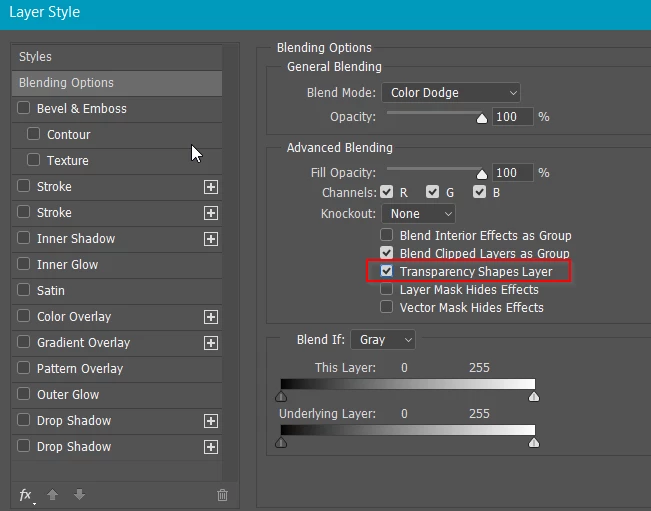
I was able to get the same effect by unchecking the transparent shape layer, but in recent versions, when I reopen the file, it goes back to being checked.

I have reported the same bug many times, but there is no sign that it will ever be fixed.


https://community.adobe.com/t5/photoshop-ecosystem-bugs/photoshop-color-dodge-bug/idc-p/12272738#M3852

Trevor.Dennis
Community Expert
Community Expert
November 16, 2021

You need to bring this up on the feedback site.  No Adobe employees will see it here

Adobe Photoshop Family

Ged_Traynor
Community Expert
Community Expert
November 16, 2021

Hi Trevor

The Adobe feedback site is closed, bugs are reported on this community now

davescm
Community Expert
Community Expert
April 30, 2017

Just tried it here and a white gradient over black shows when in normal blending mode but does not when in color dodge. This is as expected.

Note -  this was in RGB mode (tried both 8 and 16 bit) on Windows 10 and an AMD 7970 graphics card in with GPU set to advanced

Normal:

Color dodge:

Have you tried changing the GPU settings (Off - Advanced /Normal/Basic) to see if that makes any difference?

Dave

Participating Frequently
April 30, 2017

Hi Dave,

That background I used is actually a 90% grey, not black. As yes, a white over black in Color Dodge mode will disappear as you've shown.

I tried something whereby i merged the white gradient layer with the dark grey layer and then put in Color Dodge mode back over another flat grey background and it display correctly!! See below.

It seems that if a layer has transparency, the Color Dodge mode will not work?!

And changing the GPU settings makes no difference.

Bob.

Trevor.Dennis
Community Expert
Trevor.DennisCommunity ExpertCorrect answer
Community Expert
April 30, 2017