


matheusn
New Member
December 18, 2025
Answered

Color panel no longer updates live when using Color Balance (regression from 2025)

  • December 18, 2025
  • 9 replies
  • 414 views

Since updating to Photoshop 2026, the Color panel no longer updates live when adjusting Color Balance (Image > Adjustments > Color Balance).

In Photoshop 2025 and earlier, the Color panel reflected the changes in real time while moving the sliders. Now, the panel only updates after confirming the adjustment.


This is a regression and breaks color correction workflow, especially when relying on numeric RGB feedback.


Steps to reproduce:
1. Open any image
2. Open Color panel

3. Go to Image > Adjustments > Color Balance
4. Adjust sliders with Preview enabled
5. Notice the Color panel does not update live


Expected behavior:
Color panel updates in real time during Color Balance adjustments (as in Photoshop 2025).


Actual behavior:

Color panel remains static until adjustment is applied.


Impact:

Slows down professional color correction workflows and removes reliable numeric feedback during adjustments.

Correct answer Ged_Traynor

Hey @CMass 
I previously mentioned the machines were identical, but that was a mistake. They are two different systems — one Mac mini M2 and one Mac mini M4 — both running macOS Tahoe, and the issue occurs on both.


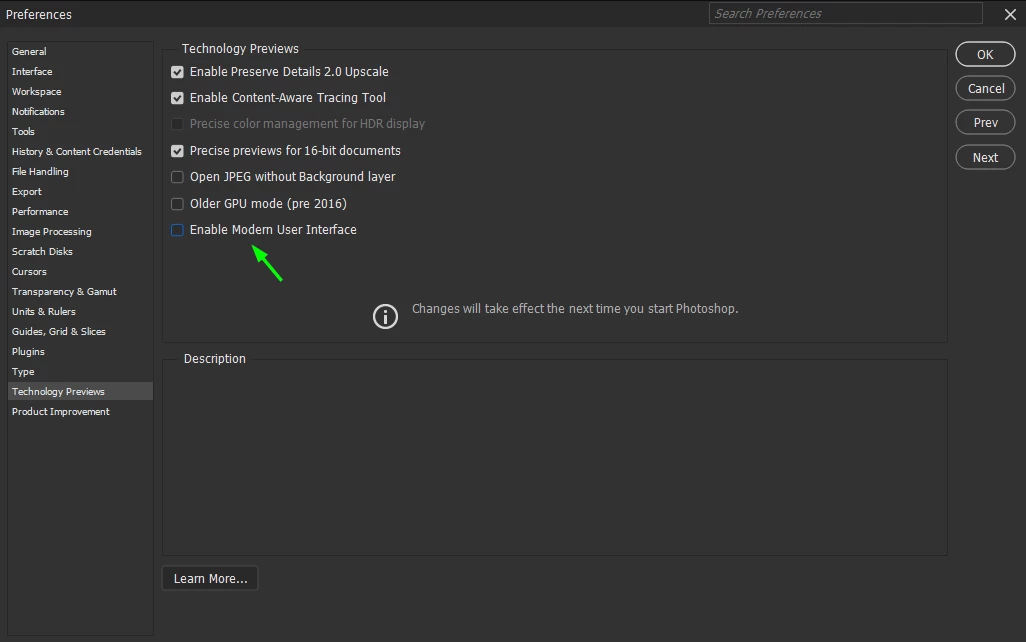
@matheusn try disabling this option in the preferences to see if it helps

875730i70ED7414E2FCFE22.png

9 replies

Ged_Traynor
Community Expert
Community Expert
December 18, 2025

@matheusn it's working as expected for me with Photoshop version 27.2 on Windows 11, are you seeing the same behaviour if you access the colour balance from the adjustments panel.

Have you tried manually resetting your Photoshop preferences
https://helpx.adobe.com/ie/photoshop/using/preferences.html#Manually
Remember to back up your settings before doing the preference reset
https://helpx.adobe.com/ie/photoshop/using/preset-migration.html

matheusn
matheusnAuthor
New Member
January 20, 2026

Thanks for checking @Ged_Traynor.
I can confirm the same behaviour occurs whether Color Balance is accessed via Image > Adjustments or via an Adjustment Layer.

This is on macOS, not Windows, so it may be a platform-specific regression. Resetting Photoshop preferences does not resolve the issue.

In Photoshop 2025 and earlier, the Color panel updated live during Color Balance adjustments. That real-time feedback is now missing, which breaks color correction workflows.

matheusn
matheusnAuthor
New Member
January 20, 2026

This issue occurs on both my work and home machines, using different user accounts but the same hardware and macOS Tahoe, which rules out user-specific preferences and indicates a platform-level regression.