slrsjs
Participant
October 17, 2017
Answered

color problem

  • October 17, 2017
  • 1 reply
  • 407 views

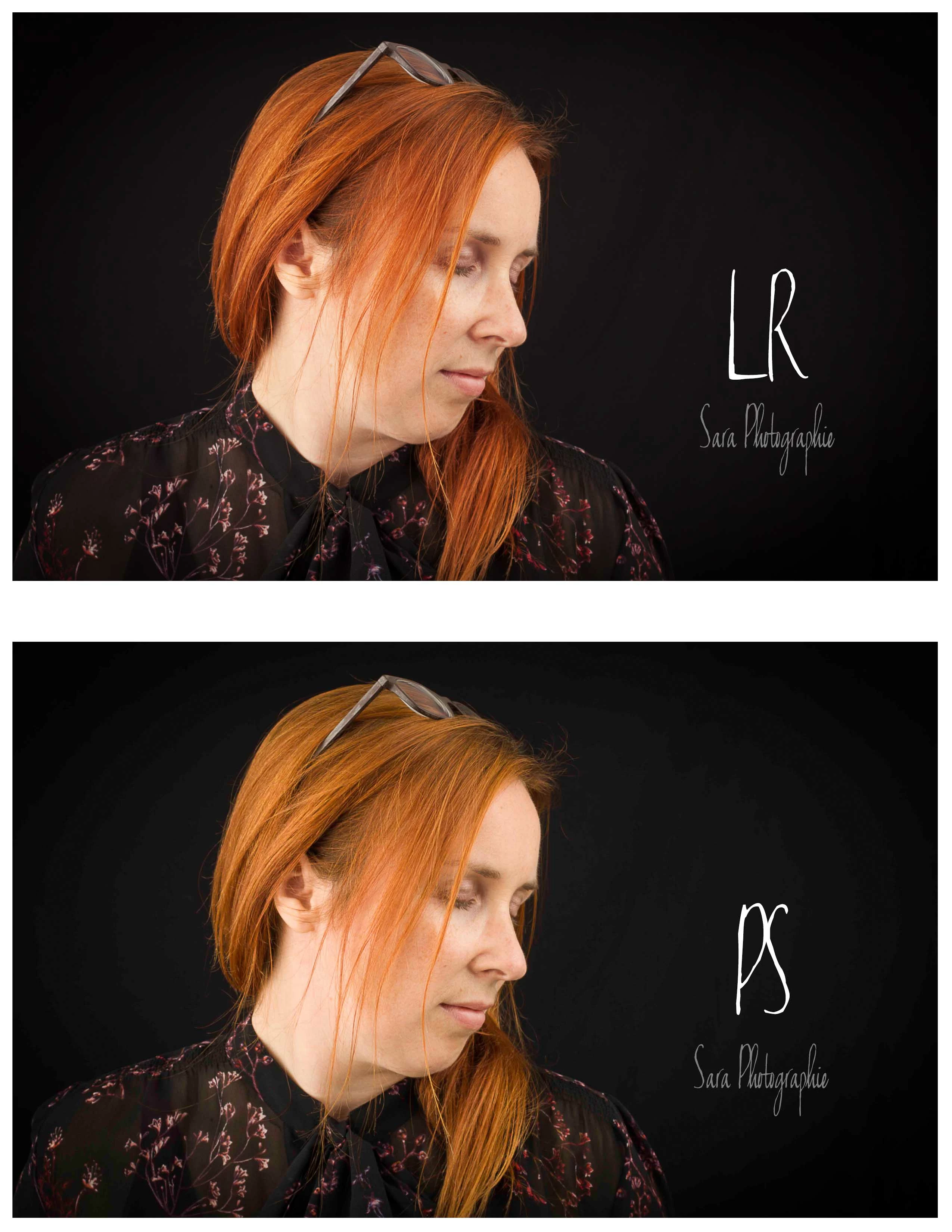
Hello! For two weeks, I have problems of color with PS. Although I try various ways to program my preferences, I do not come to anything conclusive.

I work with PC and I have done the recent update of Creative Cloud. If I open my RAW file directly in Camera RAW., The hues also come out orange like in PS. It is only in LR that the colors remain the good ones. Before that, I did not have problems. I do not know if it can be with Window 10 that I can get into trouble.

I even tried to uninstall PS today, but without success.

I'm trying my luck here. I speak mainly in French and I use a translator to write this message to you.

Thanks in advance.

Sara

    This topic has been closed for replies.
    Correct answer D Fosse

    I D Fosse!

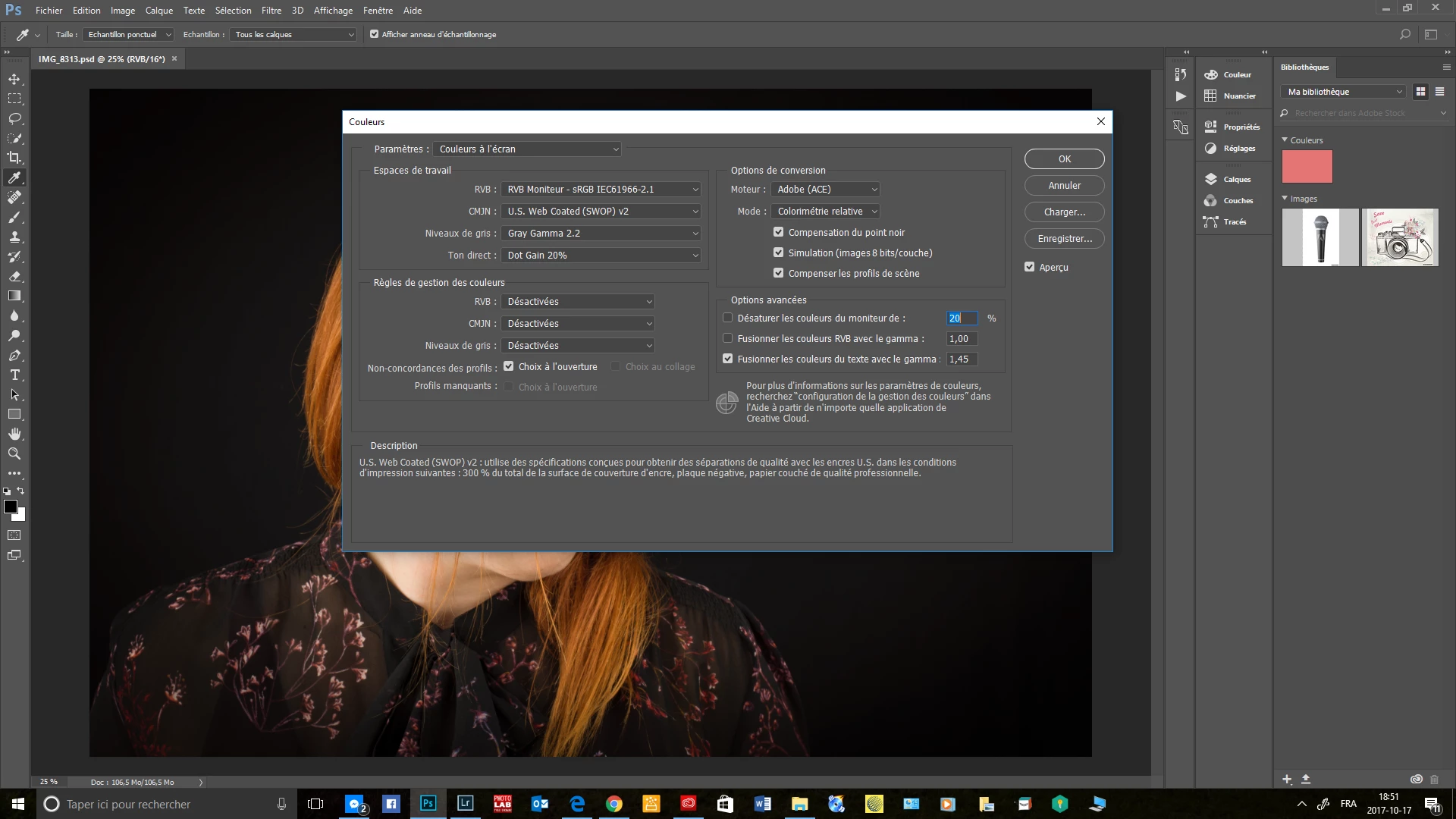
    Thank you for your reply! I would like to see with you if I understand what you are explaining to me. Are you talking about the color management of the photo # 1 or the photo # 2 to make ourselves the selection of the color profile. If I'm wrong, can you tell me the right thing to put on?

    To reinitialize all my settings, is it like this in photo # 3?

    I do not remember if I changed anything of my settings when I removed and reinstalled PS yesterday in pm. I thought that might have an impact on the color problem I have. Looks like it happened when Creative Cloud made a recent update. I always used to leave the parameters as they are, but with this problem, I tried to do some tests at the level of the color profiles to be ok between LR and PS. I found that the problem did not come from LR, but from PS. Initially, I left LR to edit my photo in PS and that's when I realized that the colors with this aspect. So, that the day before everything was functional and with the right colors without having changed anything in my settings.

    I've been doing photography for 7 years and I've never had that kind of boredom ... I'm not a training photographer, but a young retired teacher who, because of my multiple sclerosis, decided to do something more suited to his situation. I learn Photoshop self-taught and I find it strange that everything goes well with my second laptop that is under the platform window 7 and with my PC under Window 10, things work badly ... the taste of maybe make it format to start afresh and see what it will give. It has been a year since he has been operating steadily. There may be some issues to correct.

    One day I will maybe go to Apple !!!! To start again with all the hard drives filled with photos (not compatible I think if I change ...) and learn this platform may have to be more up to date with the world of Apple!

    Thank you for taking the time to help me! I will see according to your answer if I go ahead to make it format history to see if I have trouble at the level of my PC as such, because I must say he did me some strange little things these last time. It may be due for a good cleaning!


    It's this one:
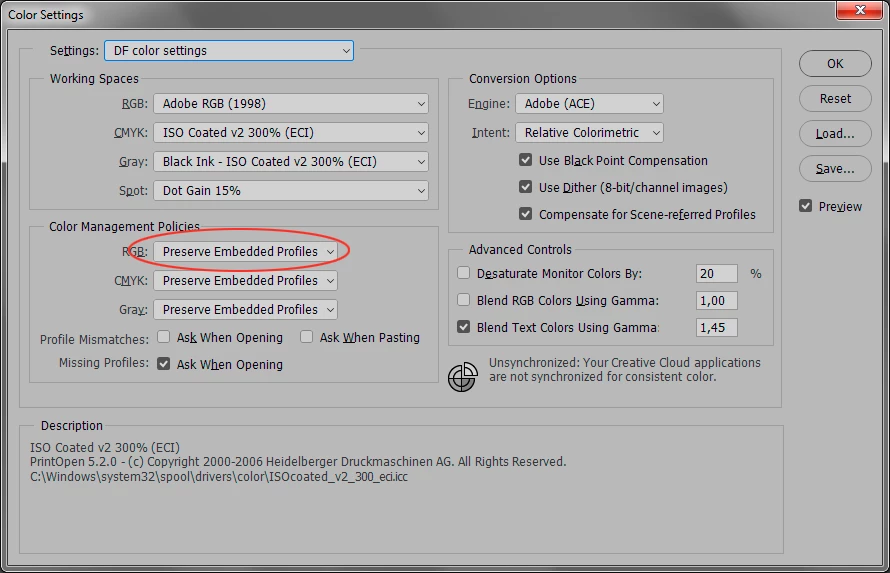
    I apologize for not knowing what it's called in French. With this setting checked, you'll also get a real choice of standard working spaces. Which one you choose here isn't that important, but sRGB is probably the safest. In any case this is just a default for new files.

    Any incoming profile will be correctly handled with "preserve embedded profiles". This is especially important with files from Lightroom, which has a default of sending files to Photoshop in ProPhoto RGB (this can, and perhaps should, be changed in Lightroom preferences).

    Oh, BTW, some people think this works "better" in Mac - it doesn't. All Adobe software works identically on both platforms.

    1 reply

    slrsjs
    slrsjsAuthor
    Participant
    October 17, 2017

    I am sorry, but LR is programmed in this way and not as the one presented in my first publication.

    D Fosse
    Community Expert
    Community Expert
    October 18, 2017

    Why have you set Photoshop color management to "off"? Who told you to do that?

    Never, ever, set color management policies to "off"! Reset everything to default settings ("preserve embedded profiles").

    slrsjs
    slrsjsAuthor
    Participant
    October 18, 2017

    I D Fosse!

    Thank you for your reply! I would like to see with you if I understand what you are explaining to me. Are you talking about the color management of the photo # 1 or the photo # 2 to make ourselves the selection of the color profile. If I'm wrong, can you tell me the right thing to put on?

    To reinitialize all my settings, is it like this in photo # 3?

    I do not remember if I changed anything of my settings when I removed and reinstalled PS yesterday in pm. I thought that might have an impact on the color problem I have. Looks like it happened when Creative Cloud made a recent update. I always used to leave the parameters as they are, but with this problem, I tried to do some tests at the level of the color profiles to be ok between LR and PS. I found that the problem did not come from LR, but from PS. Initially, I left LR to edit my photo in PS and that's when I realized that the colors with this aspect. So, that the day before everything was functional and with the right colors without having changed anything in my settings.

    I've been doing photography for 7 years and I've never had that kind of boredom ... I'm not a training photographer, but a young retired teacher who, because of my multiple sclerosis, decided to do something more suited to his situation. I learn Photoshop self-taught and I find it strange that everything goes well with my second laptop that is under the platform window 7 and with my PC under Window 10, things work badly ... the taste of maybe make it format to start afresh and see what it will give. It has been a year since he has been operating steadily. There may be some issues to correct.

    One day I will maybe go to Apple !!!! To start again with all the hard drives filled with photos (not compatible I think if I change ...) and learn this platform may have to be more up to date with the world of Apple!

    Thank you for taking the time to help me! I will see according to your answer if I go ahead to make it format history to see if I have trouble at the level of my PC as such, because I must say he did me some strange little things these last time. It may be due for a good cleaning!