Participating Frequently
Nov 20, 2026 1:28 AM UTC
Question

color question

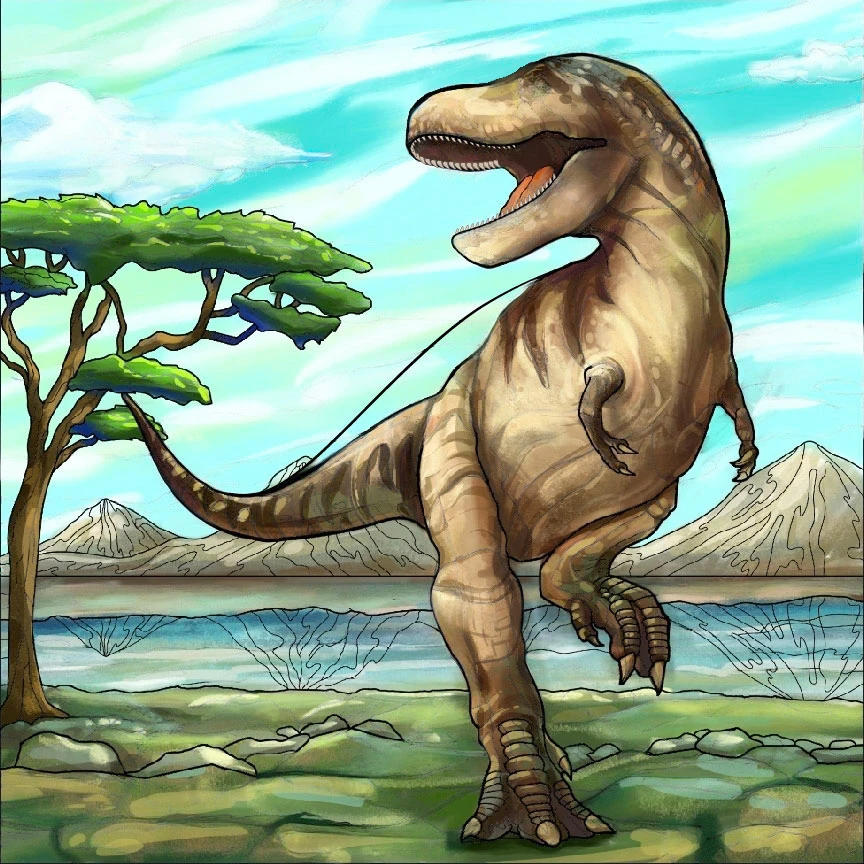
Could some one tell me how I can fill the outlined space with colors that match the dinosaur's body and add matching reflections of the mountains in the water?

 

    4 replies

    Participating Frequently
    Nov 20, 2026 11:50 PM UTC

    Can you restate what you just said, this time just for the dinosaur, please?

    Translate
    Participating Frequently
    Nov 21, 2026 5:44 AM UTC

    Of course — same idea, just on the dinosaur itself. I'd put the colour on a new layer above the line art and set it to Multiply, so the black outlines still show through. Then I'd Lasso around one part at a time — the body first — and paint inside the selection with the Brush, sampling the browns and tans from your sketch with the Eyedropper so the shades stay in harmony. For the bigger flat areas you can select and try Generative Fill with a prompt like 'brown dinosaur, soft shading' instead, then tune the layer opacity until it looks right.

    Translate
    Participating Frequently
    Nov 20, 2026 5:44 AM UTC

    I color line art the same way and the Multiply layer trick is the one that finally made it click for me. I sample the body color with the eyedropper while the brush is active, then paint on a fresh Multiply layer so the outlines stay crisp. For the water area I usually lasso it loosely first so I don't spill color onto the grass.

    Translate
    CORCTON34033231
    Community Expert
    Community Expert
    Nov 20, 2026 3:05 AM UTC

    Hi Robert — nice illustration! Do both jobs on new layers, so the line art stays untouched.


    Filling the outlined area:

    - Add a new layer above the image and set its blend mode to Multiply — that way your black outlines still show through the colour.

    - Select the outlined water/reflection area (Lasso tool works well here), then paint inside the selection with the Brush. Sample colours from the dinosaur with the Eyedropper (hold Alt while the Brush is active) — its browns and tans will keep the new colour in harmony with the body. A quicker alternative for the larger areas is to select the area and use Edit > Generative Fill with a prompt like "water coloured to match the brown dinosaur and blue sky".


    Reflections of the mountains:

    - Select the mountain area, copy it to a new layer (Ctrl/Cmd + J), then Edit > Transform > Flip Vertical and drag it down into the water, just below the waterline.

    - Lower that layer's Opacity to around 20-30%, add a layer mask and fade the lower edge with a soft black brush, so the reflection dies away with depth.

    - Finally, Filter > Distort > Ripple (or Ocean Ripple) at a small amount to break the reflection up like real water.


    Work on separate layers for the colour and the reflection, so you can tune the opacity of each afterwards.

    Translate