
Participant
Oct 19, 2026 10:47 AM UTC
Question

Color table's order change when I save in pcx

Good morning

I need to organise my table color from the end, like this 
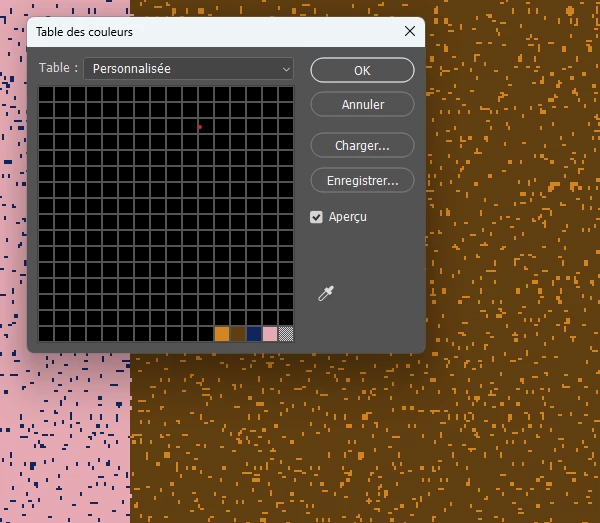
If i save in TIFF, this table remain the same. But if I save in PCX, the table restart from code 0.

like here :
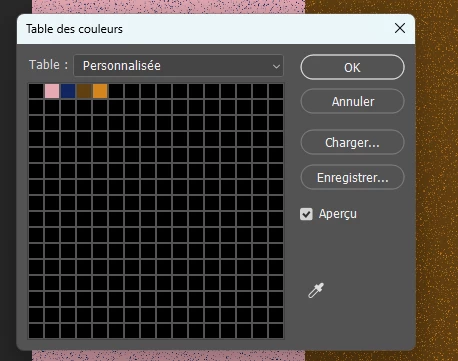
This trouble happen in Photoshop 27. On Photoshop 24, the table kept the same order, but since i’m working on Photoshop 27, this re-order happen and ruin my file. 

My question : how to keep the color table in the same order, from TIFF to PCX. 

Regards, 


    1 reply

    Srishti Bali
    Community Manager
    Community Manager
    Oct 19, 2026 3:13 PM UTC

    Hi ​@Beauteous_amazementc2d5 


    Thank you for reaching out.To help us investigate this further, could you please provide the following details?

    1. What is the exact version of Photoshop 27 you're currently using (for example, 27.0, 27.1, etc.)?

    2. Which operating system and version are you using (Windows or macOS)?

    3. Does this issue occur with all Indexed Color images or only with specific files?

    4. Could you please share a sample TIFF file and the resulting PCX file so we can examine the difference in the Color Table order?

    5. Could you also share a short screen recording demonstrating the steps you follow when converting or saving the TIFF file to PCX?

    Additionally, could you confirm whether you're using the same color settings and workflow in Photoshop 27 as you did in Photoshop 24?

    These details will help us reproduce the behavior and investigate it further.

    Translate
    Thanks, Srishti Bali | Community & Engagement Strategist, Digital Imaging | Adobe