
Participant
September 17, 2023
Question

Color value selection problem on Color Picker

  • September 17, 2023
  • 16 replies
  • 1968 views

Color value selection problem on Color Picker

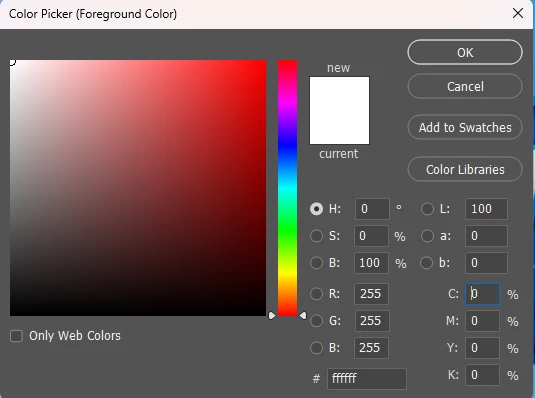
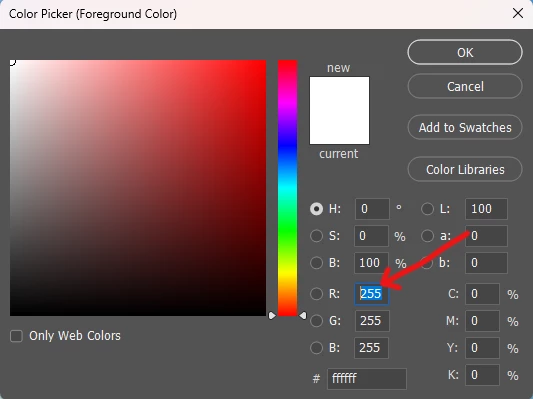
Whenever i change the value of the colour by pressing tab key, the value is not selected automatically prevouisly it was selected when pressing the tab key
This topic has been closed for replies.

16 replies

Participant
November 22, 2023

same here

Inspiring
November 9, 2023

Same here.

Participant
November 4, 2023

I'm sorry but how is this still not fixed?

Ged_Traynor
Community Expert
Community Expert
October 28, 2023

@Trevor.Dennis "I am sure the Development Team are working as hard as they can to fix things properly"

Why would the development team push out an update with a known issue with the color sliders that was reported in the beta version and not fixed

https://community.adobe.com/t5/photoshop-beta-bugs/p-photoshop-beta-25-1-0-color-picker-not-updating/idc-p/14191858

Yet Adobe in their wisdom decided to roll out version 25.1 known the issue wasn't fixed

https://community.adobe.com/t5/photoshop-ecosystem-bugs/photoshop-2024-color-sliders-don-t-work/idc-p/14187632

There's plenty of other bugs been reported in the bug section of the forum and the Adobe team seem to have abandoned even acknowledging them, they seem to be more interested in AI rather then addressing bugs in Photoshop

Semaphoric
Community Expert
Community Expert
October 27, 2023

I'm just struck by how many color-oriented controls got messed up in the same release.


Trevor.Dennis
Community Expert
Community Expert
October 27, 2023

I've been trying to look at how this functions and possible workarounds till the issue is resolved.  ISTM that the two issues are that the cursor does not move acording to the colour value under the cursor, and I have also seen talk of being unable to tab through the fields in order to edit them.


The best option I can think of is to click on the forground colour to open the Color Picker, which does update with cursor position, although the Color panel remains static.  You can escape out of the Color Picker, but you need to hit or click on Enter to select the colour.  I can still tab through the fields, and Shift tab to go backwards through the fields.  They are usually highlighted so can be edited, but if not, hit the up or down arrow keys to select the field.


I am sure the Development Team are working as hard as they can to fix things properly.  They were super quick implementing an option to turn off the layer mask badges.  Photoshop is using 5.6Gb of disk space on my Windows 11 system.  That's a lot of code and we have been told that fixing one thing can break another plus it has to work acrossa lot of different hardware configurations and operatings systems.

Participant
October 26, 2023

I agree it is very frustrating. Unfortunately, even the released 25.1 update didn't fix this bug 😞

Participating Frequently
October 19, 2023

Any news? This bug is driving me crazy for few weeks now.
Do something!!!

Known Participant
October 9, 2023

Yes, same here, please fix this annoying bug asap.
Thanks!

D Fosse
Community Expert
Community Expert
October 8, 2023

OK. Well, that should qualify as a bug then.