
Colors don't match when updating smart objects
Hello everyone, I'm going crazy and can't figure out where I'm going wrong.
A year ago, I created icons for a macOS program (so, ICNS files). To do this, I used a PSD file provided by Apple in 2022. All the instances in various sizes are included in the same file; you just double-click on the smart object, Illustrator opens, you create the icon design, and when you save, all the instances update automatically. It all worked perfectly.
Now, a year later, I need to create new icons. But when I edit the Illustrator file and save it, the PSD updates with colors that don't match the previous icons. Of course, whenever I open the documents in either PS or AI, I choose to keep the embedded profile, but something isn’t working anymore.
Any ideas? Thank you, bye!
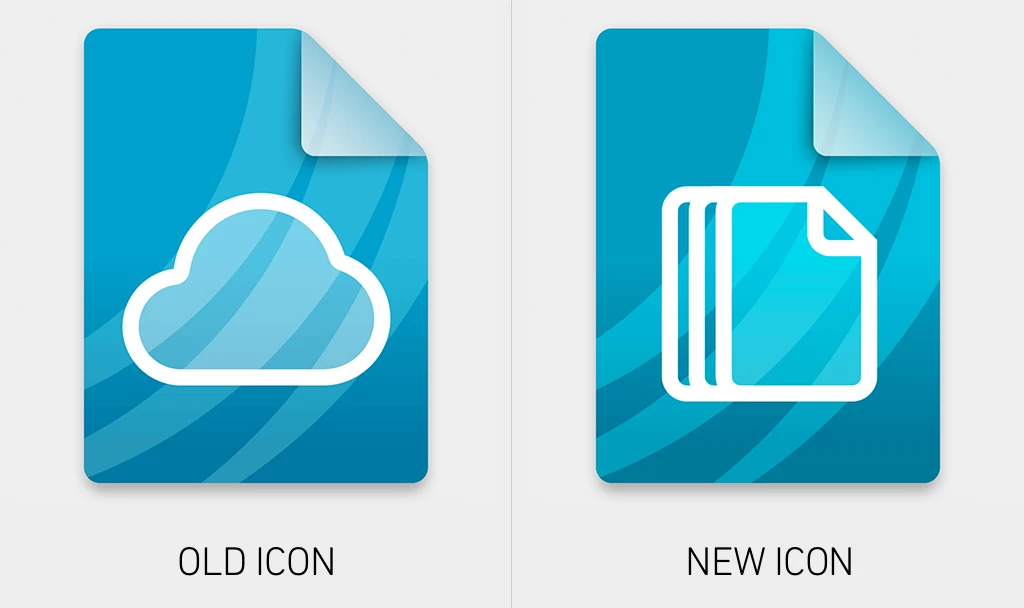
Here an image with the color differences between an icon from last year and a current one.


 AdChoices