
Colors in color picker are not displayed correctly.
Hello everybody. I want to ask for help. I installed Photoshop on my new laptop. And in Color Picker the colors are displayed in black.
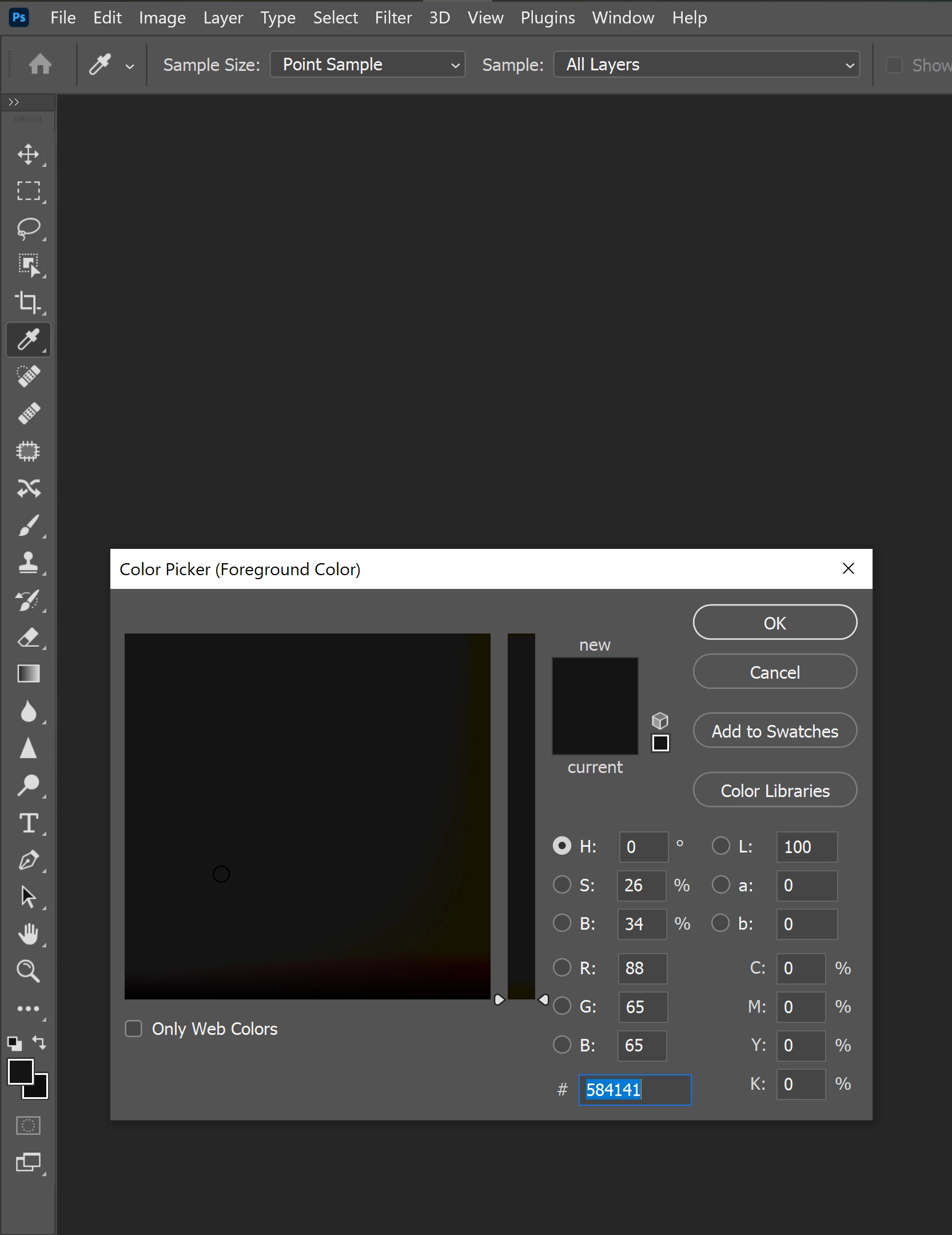
SYSTEM INFO:
Adobe Photoshop Version: 22.1.0 20201125.r.94 2020/11/25: 4b16c876033 x64
Operating System: Windows 10 64-bit
Version: 10 or greater 10.0.18362.1110
System architecture: Intel CPU Family:6, Model:5, Stepping:2 with MMX, SSE Integer, SSE FP, SSE2, SSE3, SSE4.1, SSE4.2, AVX, AVX2, HyperThreading
Physical processor count: 6
Logical processor count: 12
Processor speed: 2592 MHz
Built-in memory: 32563 MB
Free memory: 20874 MB
Memory available to Photoshop: 29820 MB
Memory used by Photoshop: 70 %
ACP.local Status:
- SDK Version: 1.34.1
- Core Sync Status: Reachable and compatible
- Core Sync Running: 4.3.4.2
- Min Core Sync Required: 4.3.4.2
ACPL Cache Config: Unavailable
Live Edit Client SDK Version: 3.77.11
Native GPU: Enabled.
Manta Canvas: Enabled.
Alias Layers: Disabled.
Modifier Palette: Disabled.
Highbeam: Disabled.
Image tile size: 1024K
Image cache levels: 4
Font Preview: Medium
TextComposer: Latin
Display: 1
Display Bounds: top=0, left=0, bottom=2160, right=3840
OpenGL Drawing: Enabled.
OpenGL Allow Old GPUs: Not Detected.
OpenGL Drawing Mode: Advanced
OpenGL Allow Normal Mode: True.
OpenGL Allow Advanced Mode: True.
NumGLGPUs=1
NumCLGPUs=2
NumNativeGPUs=2
glgpu[0].GLVersion="2.1"
glgpu[0].IsIntegratedGLGPU=0
glgpu[0].GLMemoryMB=5980
glgpu[0].GLName="GeForce RTX 2060/PCIe/SSE2"
glgpu[0].GLVendor="NVIDIA"
glgpu[0].GLDriverVersion="27.21.14.6089"
glgpu[0].GLDriverDate="20201211000000.000000-000"
glgpu[0].GLRenderer="GeForce RTX 2060/PCIe/SSE2"
glgpu[0].HasGLNPOTSupport=1
glgpu[0].CanCompileProgramGLSL=1
glgpu[0].GLFrameBufferOK=1
clgpu[0].CLPlatformVersion="OpenCL 2.1 "
clgpu[0].CLDeviceVersion="2.1"
clgpu[0].IsIntegratedCLGPU=1
clgpu[0].CLMemoryMB=13657
clgpu[0].CLName="Intel(R) UHD Graphics"
clgpu[0].CLVendor="INTEL"
clgpu[0].CLBandwidth=2.800000e+10
clgpu[0].CLCompute=191.573560
clgpu[0].CLRawDeviceName=Intel(R) UHD Graphics
clgpu[0].CLRawDeviceVendor=Intel(R) Corporation
clgpu[0].CLRawPlatformName=Intel(R) OpenCL HD Graphics
clgpu[0].CLRawPlatformVendor=Intel(R) Corporation
nativegpu[0].NativeName="7957:NVIDIA GeForce RTX 2060"
clgpu[1].CLPlatformVersion="OpenCL 1.2 CUDA"
clgpu[1].CLDeviceVersion="1.2"
clgpu[1].IsIntegratedCLGPU=0
clgpu[1].CLMemoryMB=6442
clgpu[1].CLName="GeForce RTX 2060"
clgpu[1].CLVendor="NVIDIA"
clgpu[1].CLBandwidth=2.320000e+11
clgpu[1].CLCompute=1729.960142
clgpu[1].CLRawDeviceName=GeForce RTX 2060
clgpu[1].CLRawDeviceVendor=NVIDIA Corporation
clgpu[1].CLRawPlatformName=NVIDIA CUDA
clgpu[1].CLRawPlatformVendor=NVIDIA Corporation
nativegpu[1].NativeName="39876:Intel(R) UHD Graphics"


 AdChoices