November 25, 2025
Answered

colour space default to actually default to my colour settings please

  • November 25, 2025
  • 3 replies
  • 187 views

Rgb deafults to s-rgb whereas my working space colour settings are adobe 1998. Surely this should default to my working space.

Correct answer NB, colourmanagement

@Lousie23547089g2al as @davescm wrote, the Photoshop 'color settings' defaults are for new documents created in Photoshop. (so when you open a new blank file i.e. using - 'File > New').


When opening an existing file the preferred behaviour for most users is to preserve the embedded profile. So, the file stays in its existing color space, no conversion is made.

It seems like the files you are opening have the sRGB icc profile embedded. 


What to do?

It is possible, in Photoshop's 'color settings', under 'Color Management Policies' (see screenshot below),

to select "convert to 'Working RGB' - in your case, this would be Adobe RGB, it seems. 
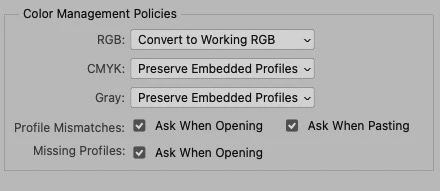

If you open a file with sRGB embedded, and, if you have "Profile Mismatches" checked, as I did above, you'll get a pop up (see below) that states that the embedded profile is sRGB with the default behaviour to convert to Adobe RGB 

so, should you wish to convert your image file to Adobe RGB, then you'd just click OK here. 
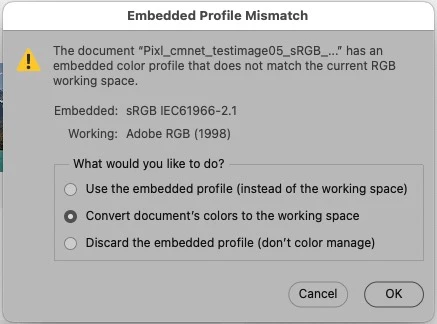


If you want that default behaviour without the "embedded profile mismatch" pop-up then you'd uncheck Ask When Opening" (see my first screenshot). I generally don't recommend that because I like users to know the provenance of files they are opening and to take control of any profile-to-profile conversions. 


Is that what you want to do? Make all your files Adobe RGB?


BTW, there is little point in converting sRGB to Adobe RGB unless you have a good reason to do so - as you're effectively pouring 2/3 pint into a pint pot. Maybe you want Adobe RGB to pass onto others, thats fine then, thats a good reason to convert  


I hope this helps

neil barstow colourmanagement - adobe forum volunteer,

colourmanagement consultant & co-author of 'getting colour right'

See my free articles on colourmanagement online

Help others by clicking "Correct Answer" if the question is answered.

Found the answer elsewhere? Share it here. "Upvote" is for useful posts



3 replies

NB, colourmanagement
Community Expert
NB, colourmanagementCommunity ExpertCorrect answer
Community Expert
November 26, 2025

@Lousie23547089g2al as @davescm wrote, the Photoshop 'color settings' defaults are for new documents created in Photoshop. (so when you open a new blank file i.e. using - 'File > New').


When opening an existing file the preferred behaviour for most users is to preserve the embedded profile. So, the file stays in its existing color space, no conversion is made.

It seems like the files you are opening have the sRGB icc profile embedded. 


What to do?

It is possible, in Photoshop's 'color settings', under 'Color Management Policies' (see screenshot below),

to select "convert to 'Working RGB' - in your case, this would be Adobe RGB, it seems. 


If you open a file with sRGB embedded, and, if you have "Profile Mismatches" checked, as I did above, you'll get a pop up (see below) that states that the embedded profile is sRGB with the default behaviour to convert to Adobe RGB 

so, should you wish to convert your image file to Adobe RGB, then you'd just click OK here. 


If you want that default behaviour without the "embedded profile mismatch" pop-up then you'd uncheck Ask When Opening" (see my first screenshot). I generally don't recommend that because I like users to know the provenance of files they are opening and to take control of any profile-to-profile conversions. 


Is that what you want to do? Make all your files Adobe RGB?


BTW, there is little point in converting sRGB to Adobe RGB unless you have a good reason to do so - as you're effectively pouring 2/3 pint into a pint pot. Maybe you want Adobe RGB to pass onto others, thats fine then, thats a good reason to convert  


I hope this helps

neil barstow colourmanagement - adobe forum volunteer,

colourmanagement consultant & co-author of 'getting colour right'

See my free articles on colourmanagement online

Help others by clicking "Correct Answer" if the question is answered.

Found the answer elsewhere? Share it here. "Upvote" is for useful posts



davescm
Community Expert
Community Expert
November 25, 2025

The working colour space in colour settings applies to new documents. Set by section 1 in the screenshot below.
When opening an existing document the default is to open in the colour space embedded within that document, thereby avoiding unnecessary colour conversions. That behaviour is set in Color Management Policies - section 2 in the screenshot below. 

Can you confirm when exactly you see the sRGB colour space being used, in relation to the scenarios above.
Dave

Community Manager
November 25, 2025

Hi @Lousie23547089g2al, welcome to the community!
Could you share a bit more about what’s happening? Which version of Photoshop are you using, and what kind of files are you working with? If they’re RAW files, Photoshop might be using the embedded profile by default.
If you can, please share a screenshot of the dialog that appears when you go to Edit > Color Settings. Or, if you’re working with RAW files, check Photoshop > Preferences > Camera Raw > Workflow and share that view.
Thanks!
Alek

*(If you mention me with an @, like @Aleke, I’ll get a notification and can respond faster.)*

