
Participant
May 13, 2024
해결됨

Constantly having to hit command+H because photoshop won't keep my settings set.

  • May 13, 2024
  • 1 답변
  • 383 조회

every 30 seconds or so photoshop brings up the "extras" setting so that I am seeing the borders, layers highlighted, etc. I have this setting turned off and have never turned it on, but now no matter how many times I turn it back off with command + H, within 30 seconds it is back on. this has been happening for nearly a month now and is severely impacting my workflow and is all-in-all extremely irritating. please address. 
최고의 답변: jane-e

@defaultnad225gvqm85 


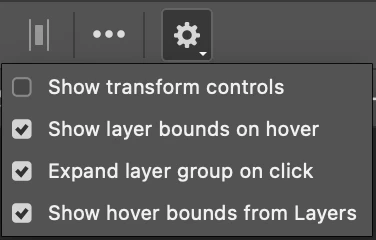
If you are seeing "Hover Layer Bounds" (as I suspect),  go to Move tool > options bar > cog dropdown and uncheck "Show hover bounds".


If you are seeing "Extras", go to View menu > Show > uncheck the ones you don't want to see.


Cmd+H and View > Extras toggle the checked items in View > Show.


Jane


1 답변

jane-e
Community Expert
jane-eCommunity Expert답변
Community Expert
May 13, 2024

@defaultnad225gvqm85 


If you are seeing "Hover Layer Bounds" (as I suspect),  go to Move tool > options bar > cog dropdown and uncheck "Show hover bounds".


If you are seeing "Extras", go to View menu > Show > uncheck the ones you don't want to see.


Cmd+H and View > Extras toggle the checked items in View > Show.


Jane


Participant
May 13, 2024

thank you, so far unchecking show layer bounds on hover and show hover bounds from layers has worked

jane-e
Community Expert
Community Expert
May 14, 2024

You're welcome @defaultnad225gvqm85  🙂,  many of us have also turned off Hover Layer Bounds.


Jane