
Content Aware Fill doesn't appear in Photoshop CS5
Yes, I realize I'm using an old version, but I cannot afford to upgrade to a newer one.
With that said, Content Aware Fill is not available on my version of photoshop for some reason. It has always worked in the past. But when I built a new PC, I tried installing my edition of Photoshop CS5 on it. Everything went well, everything authenticated. But I no longer have access to the feature Content Aware Fill. When I press Shift+F5, Content Aware Scale appears. When I look under the Edit menu, content Content Aware SCALE appears.
I assumed I simply had to make it visible in the Photoshop Default set. So I did the following:
Edit > Menus; Menu for: "Application Menus", Set: "Photoshop Defaults".
Expanded the Edit menu by clicking on the '>' by it, and scrolled down to try and find Content Aware Fill (which is normally between Fill and Content Aware Scale). However, it doesn't appear there at all.
Here's a screenshot. How to I re-enable Content Aware Fill?
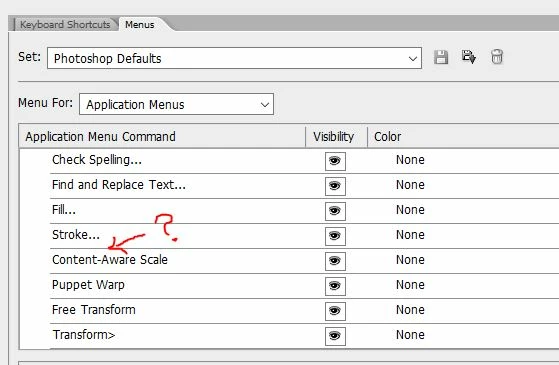
I've tried uninistalling/reinstalling the program, but that didn't work. How do I re-enable Content Aware Fill?


 AdChoices