

dNello
Participant
March 6, 2026
Question

Context bar Broken

  • March 6, 2026
  • 1 reply
  • 38 views

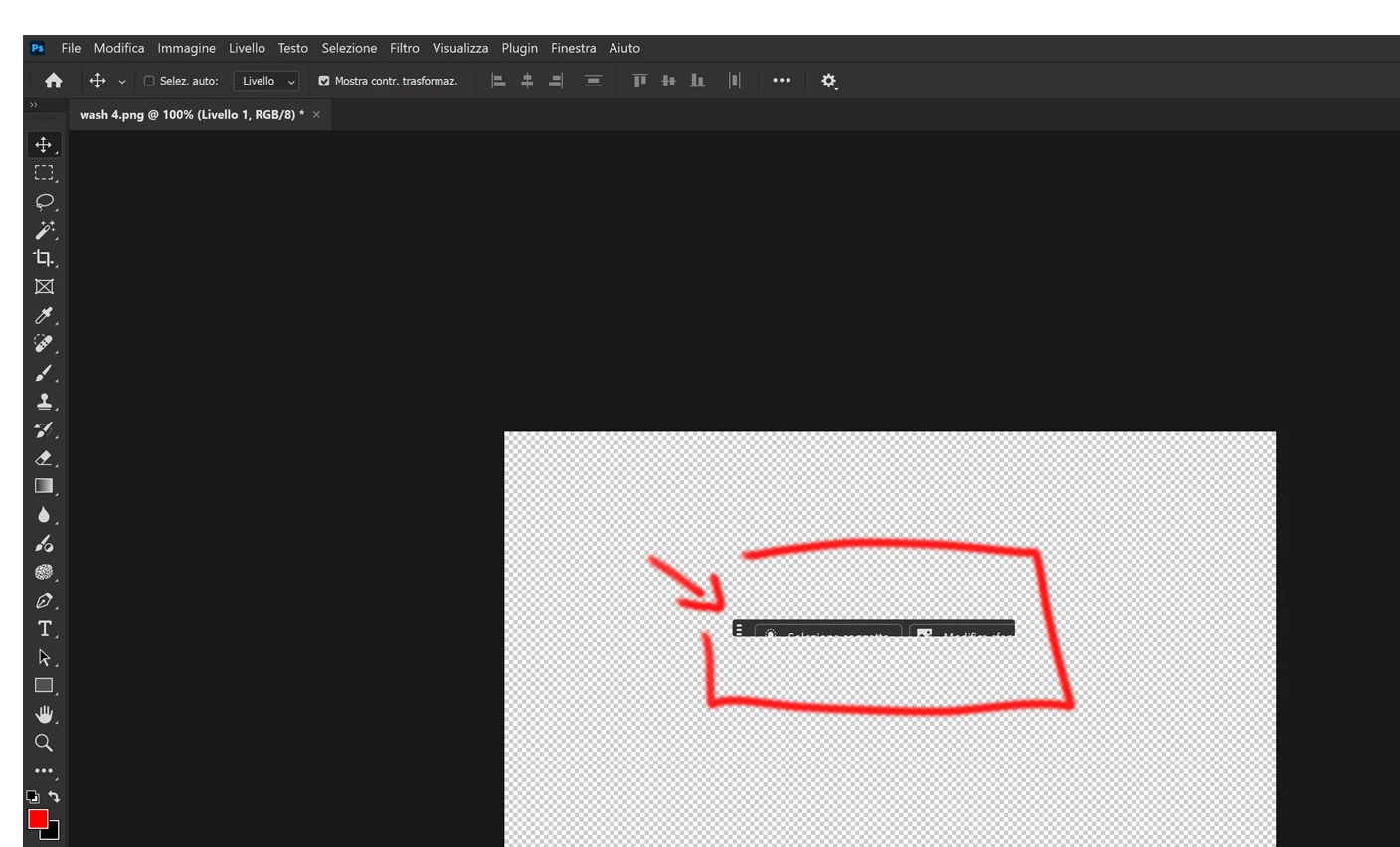
I do have photoshop in italian so I will try to translate as best as I can: After the last couple of updates the contexual bar doesn't show correctly on my wacom, no matter what I try, the only way to show in full is to move the bar on my second monitor.
this issue appear only on certain layer, in a text layer or a generated layer the bar return to his normal appereance.
Is there a workaround until it get fixed?
 

    1 reply

    Sameer K
    Community Manager
    Community Manager
    March 6, 2026

    Hey, ​@dNello. Welcome to the Photoshop Community. I'll help you figure this out. Based on the limited description, I’ve been unable to recreate this.


    Please share a video of the issue and the system info from Photoshop Help > System Info. Copy and paste it into a text document, then upload and attach it here. Any specific layers, or steps that result in this would help, too. 

    Does this happen only when Photoshop is launched on the Wacom as the primary display? Or, do you move Photoshop’s window to the Wacom screen once it is launched? 

    Please test and confirm if Photoshop (Beta) has an issue. You can get Photoshop (Beta) from the Creative Cloud > Apps tab > Beta Apps section. 


    Thanks! 
    Sameer K

    (Type '@' and type my name to mention me when you reply)

    dNello
    dNelloAuthor
    Participant
    March 6, 2026

    Thanks for the quick reply,
    The app launch on the cintiq, and I can move it between the two screens, only one is affected by the bug. On the normal monitor, I don’t have any issue at all, the context bar works as intented and It changes based on the type of layer I am working on, but if I move on the wacom cintiq, where I usually work the context bar became like in the image I uploaded before, the visible buttons still work and I can move it around, and if I move the bar on the normal monitor the bar return to his normal display.
    I can’t make the video right now, I will post it later

    Update: I think it's something to do with the resolution, I didn’t know exactly what I did but now the bar is fully visible but really tiny, I suspect it doesn’t resize properly, the cintiq is 4k while the monitor is Fullhd, from what I can imagine is that the bar fail to scale to 4k it keeps the size of the fullhd, but the ui inside scale to the 4k, resulting in the issue I am facing

      Switching to a different layer, like the text layer the bar become muxh bigger:

    restarting the app make the issue appear again

    Thanks