


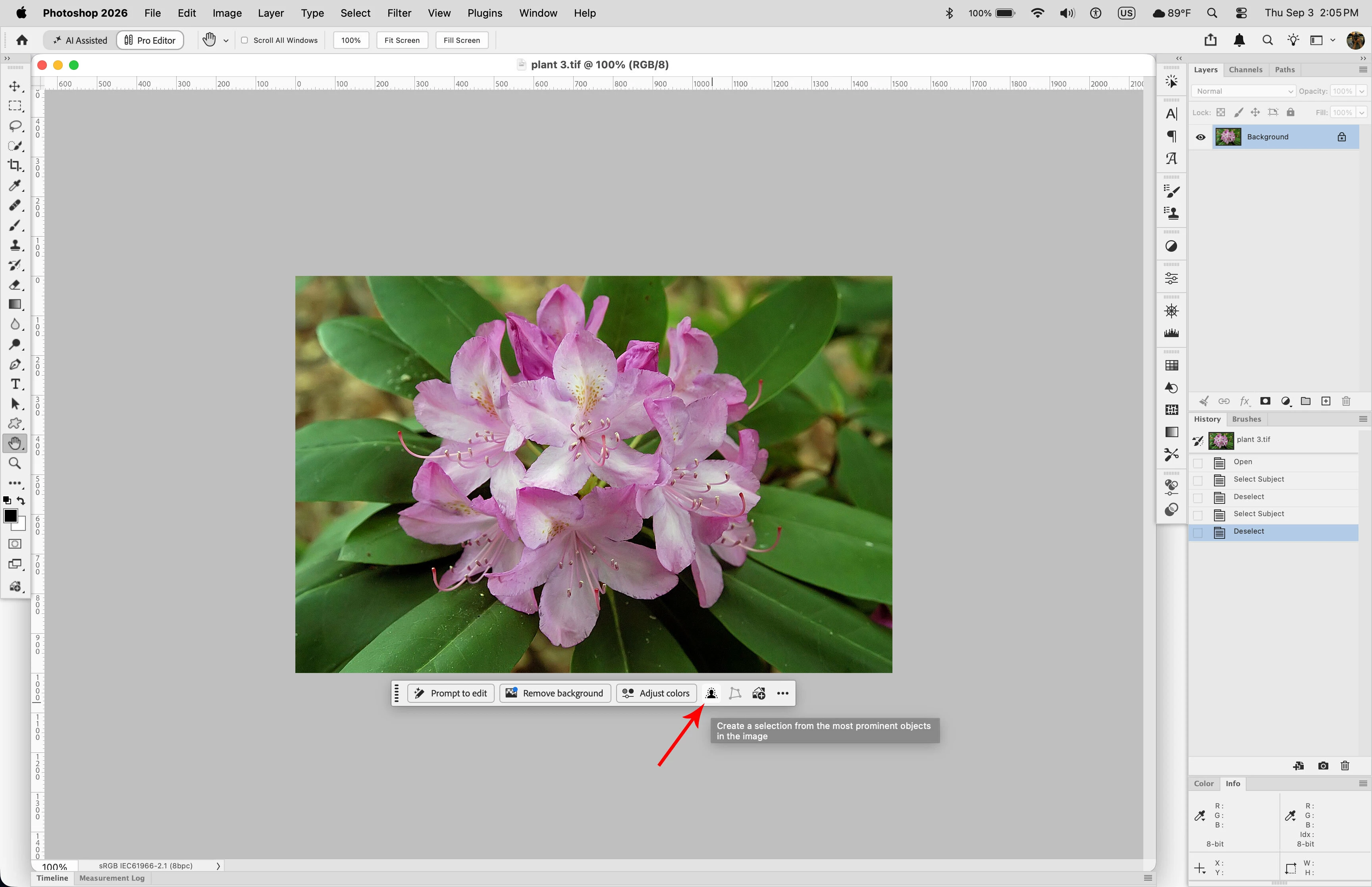
Contextual Task bar
Dear Photoshop UX Team,
I have a small question regarding the recent disappearance of Select Subject from the Contextual Task Bar:
Who asked for this?
I realize there may have been a vast, previously silent constituency of Photoshop users lying awake at night thinking, “If only Adobe would remove the extremely clear two-word command I use constantly and replace it with suggestions about things I haven't asked Photoshop to do.”
If so, congratulations. Their long nightmare is finally over.
For the rest of us, however, “Select Subject” was nearly perfect UI language.
It contained a verb: Select.
It contained an object: Subject.
And, through some extraordinary accident of linguistic efficiency, photographers already understand both words.
Even better, subject has a clearly understood relationship with another term Photoshop continues to use: background.
Subject ↔ Background.
We've been using these concepts in photography for quite some time. There are daguerreotypes involved.
More importantly, Select Subject describes an action without presuming what I intend to do next.
I might want to select the subject because I intend to adjust her exposure. Or mask her skin. Or sharpen her. Or protect her while changing something else. Or create an adjustment layer. Or modify the background. Or copy her. Or simply create a selection and decide what to do with it afterward.
Photoshop doesn't need to know.
Select. The. Subject.
Instead, my conveniently pinned Contextual Task Bar now offers things such as Remove Backgroundand Adjust Colors.
Thank you, but I didn't ask Photoshop to remove the background.
I asked it to identify the woman standing in front of it.
“Remove Background” is not a semantic replacement for “Select Subject.” It describes one particular operation that might follow selecting a subject.
Replacing Select Subject with Remove Background is rather like replacing:
SELECT FILE
with:
EMAIL THIS TO BOB
because telemetry has revealed that Bob receives quite a lot of email.
And yes, I know Select Subject still exists elsewhere in Photoshop. That's not the point.
I keep the Contextual Task Bar pinned beside the subject I'm working on, because that's where it is useful. This created a beautifully efficient workflow:
Look at subject → click Select Subject → work.
No trip to the top of a 32-inch display. No menu archaeology. No asking Photoshop what exciting AI-assisted creativity experience it thinks I should be having today.
Just:
That woman. Her. Select her.
This was apparently too straightforward.
Perhaps the problem is that “background” has also become dangerously concise. For consistency, may I suggest replacing it with:
“A grouping of similar colors, hues and gradients that aren't typically considered as relevant as the thing you're currently focused upon; you know, the thing that just happens to be in the foreground.”
Likewise:
Subject could become “Primary visually salient content identified through machine-learning-assisted semantic analysis.”
Select could become “Establish a context-aware region for subsequent creativity experiences.”
And Undo really deserves modernization.
May I suggest:
Reimagine Previous™
You're welcome. Please have Legal contact me regarding licensing.
Photoshop is professional software. Professional users develop workflows. We put controls where they're useful, develop muscle memory around them, and then proceed to spend our time making things rather than admiring the interface.
A contextual toolbar is especially valuable precisely because it puts frequently needed fundamental operations near the thing being worked upon.
What it should not become is a small Adobe employee hovering beside my photograph saying:
“I see you're working on a portrait. Would you like me to remove the background?”
No.
“Adjust some colors?”
No.
“Perhaps explore—”
SELECT THE WOMAN. SHE'S RIGHT THERE.
Please consider restoring Select Subject to the Contextual Task Bar.
Not because change is frightening.
Not because experienced Photoshop users are incapable of learning where Adobe moved something.
But because sometimes a command is already clear, concise, discoverable, useful and correctly named, and replacing it solves a problem that—as far as I can tell—was being bravely endured by absolutely nobody.
With affection from a longtime Photoshop user who would very much like his button back,
Glen Carpenter
Photographer, Houston

 AdChoices