
Known Participant
May 2, 2025
Question

Contextual Task Bar Loses Pinned Position After Sleep

  • May 2, 2025
  • 2 replies
  • 213 views
  • App Version: Adobe Photoshop 26.6
  • Platform/OS: macOS Sequoia 15.3.2 (MacBook Pro M2 Max)

Steps to Reproduce:

  1. Position the task bar to a custom location on the screen.
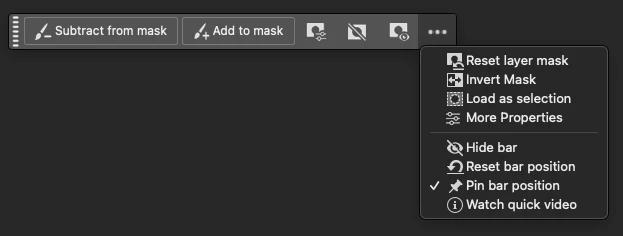
  2. Enable “Pin bar position” in the Contextual Task Bar. 
  3. Put the computer to sleep.
  4. Wake the computer and reopen Photoshop.

Expected Result:
The task bar should remain at the position where it was pinned.

Actual Result:
The Contextual Task Bar shifts to a different position after waking from sleep, despite "Pin bar position" being enabled.

Why this matters:
This breaks the UI layout consistency and forces the user to reposition the bar every time.
 

2 replies

MyronKaAuthor
Known Participant
May 2, 2025

No, when I turn off the monitors everything is fine. This happens after a long sleep, for example, several hours.

MyronKaAuthor
Known Participant
May 2, 2025

I would like to add that this may be due to the external monitors connected to my MacBook. And because of the difference in window size, this happens

Community Manager
May 2, 2025

Hi @MyronKa!

I'm sorry, but I haven't been able to reproduce the issue despite following the steps you mentioned. Could you check if the behavior is the same when you temporarily disconnect your external monitors?

Thanks so much!

Alek

*(If you mention me with an @, like @Aleke, I’ll get a notification and can respond faster.)*