


Participant
June 30, 2025
Answered

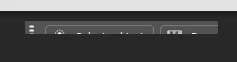
contextual task bar partiially showing

  • June 30, 2025
  • 2 replies
  • 349 views

when I updated photoshop to the latest Windows Patch 26.8..1, now my  contextual task bars are only  partially showing. I have attached a photo below. Nothing else in the environment has chganged. Is there a way to reset it or roll back to an earlier version. Anyone else having this same issue. I am running Windows 11 Pro on a Lenovo Laptop and an Ultra 7 165U processor. Suggestions and Help would be appreciated.


Correct answer lneibauer

My issues was resolved with the newest version of Photoshop (26.9) that was released a few days ago. I used it yesterday for a good part of the day with no issues

2 replies

Participant
July 31, 2025

Same issue on windows 11

Community Manager
July 31, 2025

Hi @sean_8835, welcome to the community!

Could you share a few more details, like which version of Photoshop you're using?

As a first step, it might help to reset your preferences, since that often clears up unexpected issues. Here’s how you can do that: https://adobe.ly/4ogGDlD

Let me know how it goes!
Alek

*(If you mention me with an @, like @Aleke, I’ll get a notification and can respond faster.)*
lneibauerAuthorCorrect answer
Participant
July 31, 2025

My issues was resolved with the newest version of Photoshop (26.9) that was released a few days ago. I used it yesterday for a good part of the day with no issues

lneibauerAuthor
Participant
July 1, 2025

I wanted to give you a little more detail on my problem with the Photoshop issue. I am using a duel monitor system, a Lenovo Laptop running Windows 11 and an external Dell 24 inch monitor that I do all my photoshop work on. When I unplug my external monitor and launch photoshop using the Laptop Monitor only everyhting work fine. When I plug in the second monitor and launch Photoshop the contextual task bar becomes real tiny and almost unreadable, (to me). if I then plug in the second monitor and move the window to the external monitor the contextual task bar becomes completely unreadable becasue it only shos about a 3rd of the task bar as pictured above.