
Nick V1
Participant
October 12, 2022
Answered

Control J not working

  • October 12, 2022
  • 1 reply
  • 3039 views

Hi, I'm having a strange issue since the last one or two Photoshop updates. Firstly, the keyboard shortcut Control-J is by default set to "Shape Layer Via Copy"... 


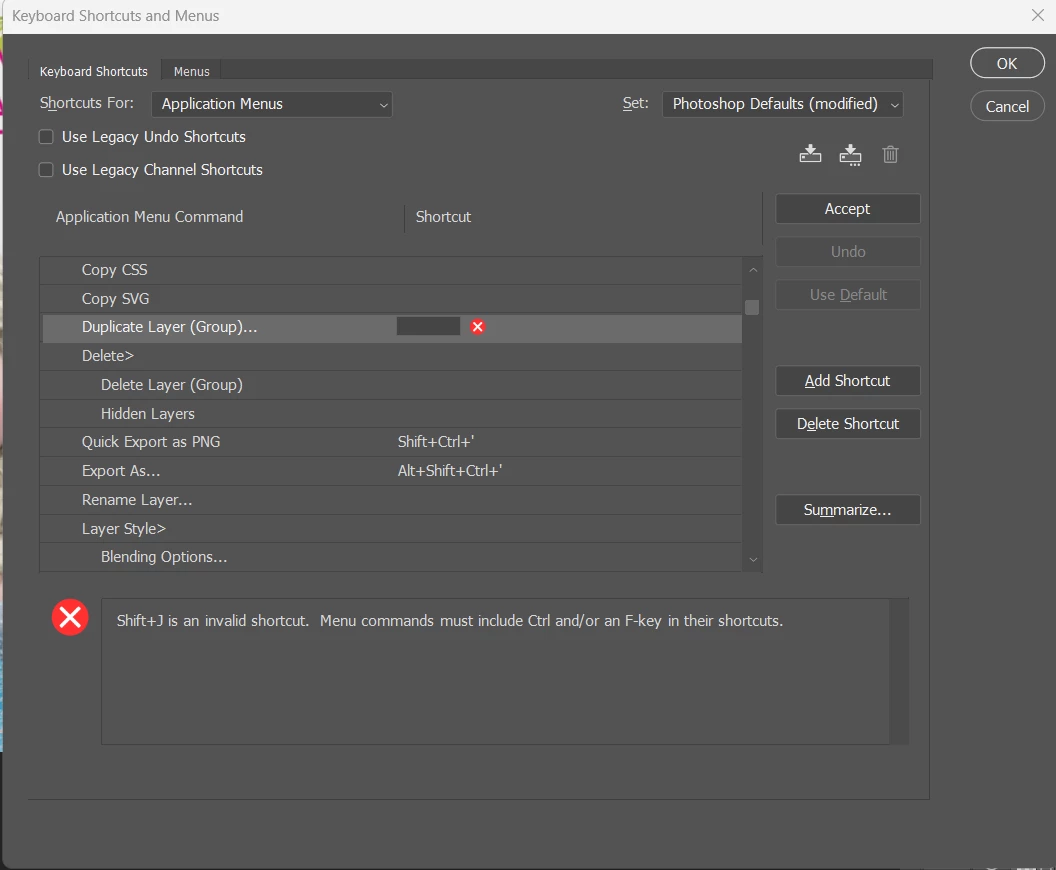
I've gone into "Keyboard shortcuts and Menus" to change Duplicate Layer (Group) to Control-J... but when I do it gives me the rror below, where it thinks I've pressed SHIFT-J.... I definitely have pressed Control-J... but it won't accept it.

Please help!
This topic has been closed for replies.
Correct answer Nick V1

I solved it. I had Auto Hotkey running in the background, and Control-J was triggering AHK! 

1 reply

Nick V1
Nick V1AuthorCorrect answer
Participant
October 12, 2022

I solved it. I had Auto Hotkey running in the background, and Control-J was triggering AHK! 

jane-e
Community Expert
Community Expert
October 12, 2022

@Nick V1 

Thank you for reporting your fix!

Jane